



Your front desk takes a call. "Can we squeeze in one more sick pet today?" The schedule already shows 42 appointments, but there's technically a gap at 2:30. They book it.
By 3 PM, your exam rooms are gridlocked. A wellness visit that should take 20 minutes stretches to 35 because the tech is still cleaning up from an emergency laceration. The afternoon vaccine appointments pile up in the lobby. Your associate vet is ping-ponging between rooms while your senior tech handles intake for three cases at once.
This isn't a staffing problem. You have four exam rooms, two vets, three techs, and a receptionist. On paper, that should handle 40-something appointments smoothly. Your actual throughput hits a wall somewhere around 32-35 before everything backs up.
Most clinics treat appointment booking like a calendar problem when it's actually capacity math. You're optimizing the wrong variable — filling time slots instead of managing flow rate through your operational bottleneck.
Why Traditional Appointment Booking Creates False Capacity
Every practice manager knows the standard scheduling template. Wellness visits get 20-minute slots. Sick visits get 15 minutes. Surgeries block off mornings. You divide your day into these chunks and book until the calendar fills up.
This system assumes your clinic operates like a series of independent transactions. Client arrives, gets seen, leaves. Next client arrives, gets seen, leaves. Pretty clean.
Watch what happens during a random Tuesday afternoon. Your 2:00 PM appointment shows up at 1:45 and needs to wait because the exam room isn't ready. The 2:15 sick visit turns out to be a suspected blockage requiring x-rays. Your 2:30 wellness exam includes three pets instead of one. The 2:45 recheck becomes a euthanasia discussion that blindsides everyone.
Every appointment for the rest of the day runs behind. Not because anyone screwed up, but because the booking system ignored the actual capacity constraints of your clinic.
The real bottleneck isn't time — it's room turnover. A four-room clinic doesn't have four rooms of capacity. You have maybe 2.5 rooms of effective capacity once you factor in cleaning, setup, documentation time, and the reality that one room often gets tied up with complicated cases.
Traditional scheduling pretends each appointment exists in isolation. Book a slot, see the pet, move on. But appointments create cascading resource demands. That routine vaccine appointment needs a tech for restraint, a room for 20 minutes, cleaning supplies afterward, and computer time for records. If any of those resources are tied up, the appointment can't flow.
Three Hidden Bottlenecks That Determine Real Capacity
Three specific bottlenecks control your actual throughput. They have nothing to do with how many appointment slots you create.
Never miss a pet’s appointment again.
Veterinaryly helps you schedule, confirm, and manage every appointment and patient record effortlessly.
- Centralized appointment & patient management
- Automated client reminders
- Staff scheduling & task tracking
No credit card required
Intake triage capacity limits how many cases you can properly assess and route. Most clinics try to triage during the appointment, which means you've already committed resources before knowing what you're dealing with. A "quick nail trim" turns into discovering a heart murmur. A "vaccine update" becomes a discussion about a suspicious lump.
Real triage happens before booking. Not just "what's wrong with Fluffy" but understanding the full scope of what this visit will require. How many pets? Previous conditions that might complicate things? Owner concerns beyond the stated reason? This takes 3-4 minutes per booking when done properly. Skip it, and you're gambling with your capacity every time.
Room transition time creates your true operational ceiling. Everyone assumes a 20-minute appointment takes 20 minutes of room time. The previous patient needs to clear out. The room needs cleaning and restocking. The next patient needs to be brought in and settled. Charts need to be pulled up. The vet needs to review history.
A 20-minute appointment consumes roughly 30 minutes of room capacity. A four-room clinic running 10 hours doesn't have 40 hours of capacity. After transitions, you have closer to 25-30 hours of actual workable time.
Documentation and follow-up work creates invisible drag on your system. Every appointment generates downstream tasks. Prescription calls, lab result reviews, callback scheduling, insurance paperwork. This work often gets squeezed into the gaps between appointments, which means those gaps aren't really gaps — they're already allocated to yesterday's cases.
At 4 PM in a busy clinic, the vet is trying to examine a patient while answering questions about morning surgery results. The tech is drawing blood while fielding pharmacy questions. The front desk is checking in appointments while processing prescription refills. Everyone is doing three jobs at once because the schedule doesn't account for continuation work.
Building Your Capacity-First Scheduling Framework
Stop thinking about appointment slots. Start thinking about flow units. Each appointment type represents a different flow unit with specific resource requirements.
A wellness exam flow unit needs 8 minutes of triage and booking time, 30 minutes of room occupation including transitions, 15 minutes of tech time, 12 minutes of vet time, and 10 minutes of downstream documentation.
A sick visit flow unit needs 10 minutes of triage (more questions required), 35-40 minutes of room time (higher uncertainty), 20 minutes of tech time, 15-18 minutes of vet time, and 15 minutes of follow-up work.
An emergency basically destroys your schedule because it needs immediate room allocation, unpredictable room time ranging from 45-90 minutes, multiple staff members simultaneously, and extensive downstream work.
Once you understand flow units, calculate real capacity. A typical mid-sized clinic might look like this:
| Resource | Total Daily Capacity | Wellness Unit Usage | Sick Unit Usage | Emergency Unit Usage |
|---|---|---|---|---|
| Room Time | 30 hours | 30 minutes | 40 minutes | 60-90 minutes |
| Tech Time | 24 hours | 15 minutes | 20 minutes | 45 minutes |
| Vet Time | 16 hours | 12 minutes | 18 minutes | 30 minutes |
| Admin Time | 8 hours | 18 minutes | 25 minutes | 40 minutes |
Run the math and you'll probably find your real capacity is around 60-70% of what your appointment schedule suggests. That's not inefficiency — that's reality.
Explicit Slot Types and Why Generic Booking Fails
Generic appointment slots assume all 20-minute blocks are interchangeable. A 20-minute wellness exam at 9 AM operates completely differently than a 20-minute sick visit at 4 PM.
Morning wellness appointments can run tighter. Pets haven't eaten (easier for procedures if needed), owners aren't rushed from work, staff energy levels are higher, and there are fewer accumulated delays from earlier appointments.
Afternoon sick visits need more buffer because of higher probability of complications, accumulated delays from the morning, staff managing multiple continuation tasks, and owners often stressed from rushing from work.
Instead of booking generic time slots, create explicit appointment types with built-in resource allocation:
-
Type A
Routine Wellness
- Scheduled only in morning blocks - 20-minute base time with 10-minute transition buffer - Can stack up to 3 consecutively - Requires one tech, one room -
Type B
Sick Evaluation
- Distributed throughout the day - 25-minute base time with 15-minute buffer - Maximum 2 consecutive before requiring a gap - Requires 1.5 tech equivalents (tech plus floater support) -
Type C
Complex Case
- Protected slots at 11 AM and 3 PM only - 40-minute allocation with 20-minute buffer - Cannot be adjacent to other complex cases - Requires dedicated tech and potential second vet consult -
Type D
Quick Procedures
- Grouped into "tech appointment" blocks - 10-minute allocations, batched processing - Scheduled only during doctor admin time - Run by techs independently
Explicit slot types prevent the cascade failures that happen when you book a complicated case into a "quick check" slot and throw off the entire afternoon.
Buffer Rules That Actually Protect Throughput
Most clinics treat buffers as wasted time. "Why leave a 15-minute gap when we could see another patient?" Buffers aren't empty space — they're pressure release valves that prevent system-wide backup.
The 80/20 buffer rule works consistently across different clinic sizes. Book to 80% of theoretical capacity, leaving 20% as buffer. That 20% gets consumed by appointments running over, cleaning taking longer after messy procedures, phone calls about earlier patients, prescription clarifications, and staff quickly grabbing water or bathroom breaks.
Start by booking to 80% of theoretical capacity and monitor how buffer consumption changes over two weeks.
Random buffers don't work. You need strategic buffer placement based on failure points.
After every third appointment: 10-minute micro-buffer for catch-up. This prevents small delays from accumulating into major backups.
Before lunch: 20-minute major buffer to absorb morning overruns. If you're still behind after this buffer, the afternoon starts fresh rather than inheriting delays.
At 3 PM: 30-minute reset buffer. Energy dips and mistakes increase around this time. Better to have a purposeful gap than pretend you can maintain morning pace.
Last hour of the day: No new appointments, only follow-ups and documentation. Every clinic tries to pack appointments until closing time, then wonders why staff stays 90 minutes late finishing paperwork.
Clinics worry about the revenue impact of buffers. Without them you book 45 appointments, actually complete 38 properly, rush through 7, and have 12 clients leave frustrated. With buffers, you book 38 appointments and complete all 38 properly with satisfied clients who actually return.
Rooming Flow Optimization Beyond Basic Logistics
The physical flow of patients through your clinic creates more bottlenecks than most people realize. It's not just about having enough rooms — it's about how patients move through those rooms.
Standard flow creates backups at every transition point. Check-in leads to waiting which leads to rooming which leads to waiting for the vet which leads to examination which leads to waiting for the tech which leads to procedures which eventually leads to checkout.
A client checks in but needs to update paperwork. Now they're blocking the desk. They get roomed but the tech is finishing another case. They wait. The vet comes in but needs additional history. Back to waiting while the tech is found. After examination, they need bloodwork but all techs are tied up. More waiting.
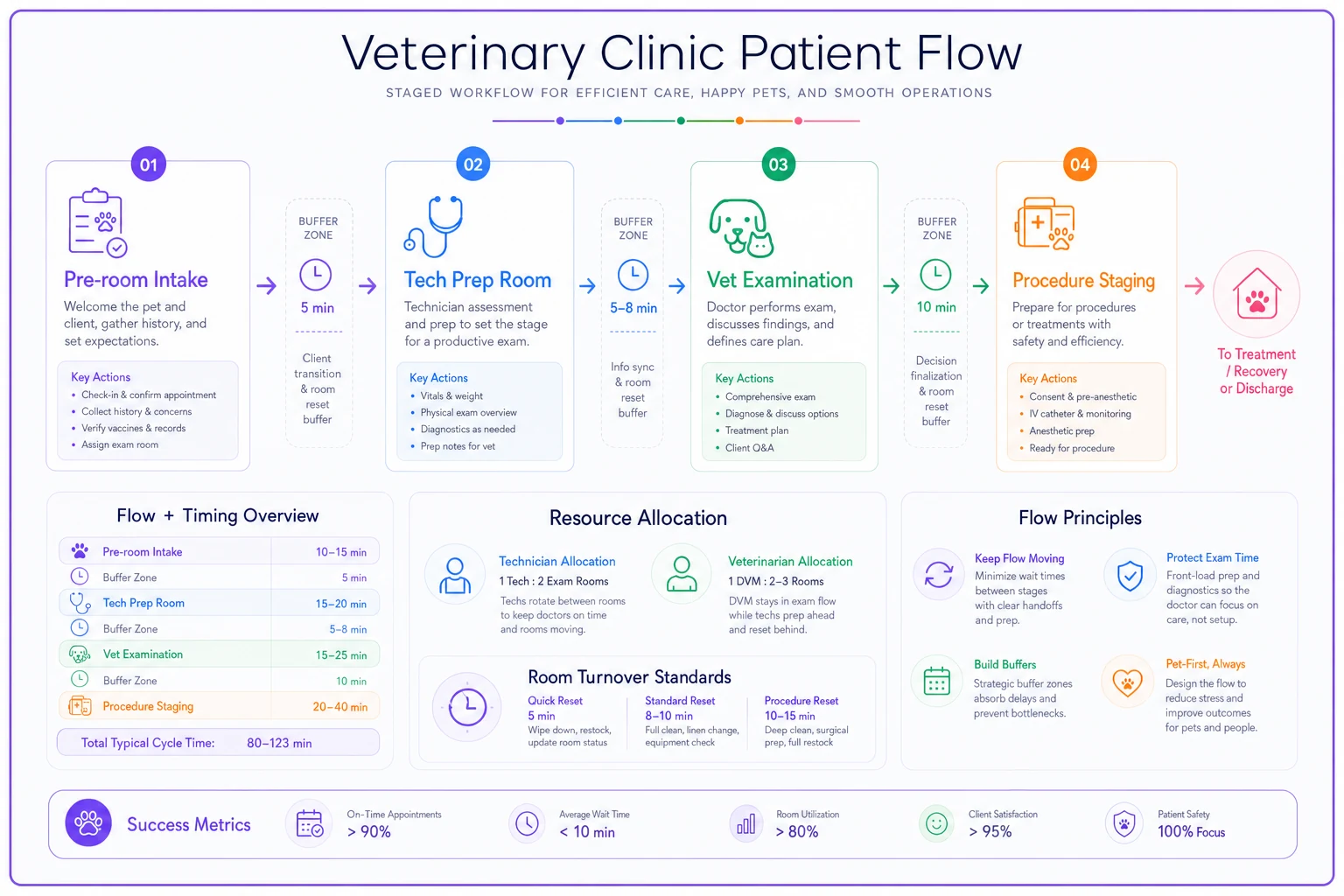
Better rooming flow uses stage-based progression:
-
1. Pre-room intake
Complete all administrative tasks before rooming. Update records, verify concerns, process payment information. This happens in the lobby or a dedicated intake space, not in an exam room.
-
2. Tech prep room
Tech completes initial assessment, weight, vitals, and basic history in a prep space. This isn't a full exam room — it's a smaller space for quick processing. The vet gets a complete picture before entering the exam room.
-
3. Vet examination
The vet enters a fully prepared situation. Patient is ready, history is complete, initial assessments are done. The vet focuses purely on medical evaluation and client communication.
-
4. Procedure staging
If procedures are needed, the patient moves to a procedure prep area while the exam room immediately becomes available. No room sits idle waiting for bloodwork or vaccines.
This staged approach means a four-room clinic can handle the throughput of a six-room traditional setup. You're maximizing the expensive resource (exam rooms) by offloading prep and procedure work to less expensive spaces.
Visualizing the staged flow can make it easier for teams to adopt the new pattern.
This is where AI-powered operational software starts making sense for larger practices. Instead of techs manually tracking which stage each patient is in and what resources they need next, the system can automate flow coordination. It knows room 2 will be available in 8 minutes, tech Sarah is finishing with room 4 in 5 minutes, and the Miller appointment needs lab work after the exam. The software orchestrates the handoffs automatically.
Real Capacity Math: A Worked Example
Numbers tell the real story about capacity versus scheduling. I tracked a mid-sized clinic for a couple weeks, and the math explains why so many practices feel constantly behind.
The setup:
-
3 vets working 8 hours each = 24 vet-hours
-
4 exam rooms available 10 hours = 40 room-hours
-
5 techs working 8 hours each = 40 tech-hours
-
Operating hours
8 AM to 6 PM
Traditional math says: If appointments average 20 minutes, that's 3 per hour, so 72 appointments possible with 24 vet-hours.
Real capacity math:
Vet capacity:
-
Subtract 30 minutes per vet for rounds/setup = 22.5 vet-hours
-
Subtract 45 minutes per vet for documentation = 20.25 vet-hours
-
Subtract 30 minutes per vet for callbacks/questions = 18 vet-hours
-
Actual appointment time
18 hours × 60 minutes = 1,080 minutes
-
Average appointment needs 18 minutes of vet time = 60 appointments maximum
Room capacity:
-
Subtract 2 hours for deep cleaning/setup = 38 room-hours
-
Each appointment needs roughly 35 minutes including transitions = 65 appointments maximum
Tech capacity:
-
Subtract 2 hours total for meetings/setup = 38 tech-hours
-
Subtract 4 hours for lab work/pharmacy = 34 tech-hours
-
Each appointment needs about 22 minutes of tech time = 93 appointments maximum
Bottleneck analysis: Vet capacity limits you to 60 appointments, but that assumes perfect flow. Add reality factors:
-
15% capacity loss to coordination overhead = 51 appointments
-
10% capacity loss to unexpected complications = 46 appointments
-
Need 10% buffer for same-day urgents = 41 scheduled appointments
Your 3-vet clinic that "should" handle 72 appointments actually has comfortable capacity for around 41 scheduled appointments plus maybe 4-5 same-day additions. This isn't pessimistic — it's profitable. Those 41 appointments get completed properly, clients stay happy, staff isn't burned out, and you can actually handle the inevitable complications without the whole system collapsing.
Warning Signs Your Current System Is Failing
If three or more of these match your clinic, you're definitely exceeding true capacity:
Your first appointment runs late at least three days per week. This means you're starting each day already behind, which cascades through everything else.
Lunch breaks become "working lunches" where staff catches up on callbacks and paperwork. When breaks disappear, you're borrowing from tomorrow's energy to pay for today's overload.
Your team regularly stays 45+ minutes after closing to finish documentation. This isn't dedication — it's evidence that your daily capacity exceeds what can be completed during operating hours.
Client complaints focus on wait times rather than care quality. When the primary frustration is operational rather than medical, your flow system is the problem.
You're seeing more appointment no-shows and last-minute cancellations. Clients learn that "2 PM appointment" means "sometime between 2 and 3:30" and start protecting their own time.
Staff turnover is creeping up, especially among experienced techs. Good people don't leave good jobs — they leave unsustainable situations where they can't provide the care standard they expect from themselves.
Emergency appointments throw off the entire day rather than just creating a minor delay. When your system has no buffer capacity, every unexpected event becomes a crisis.
The Staged Implementation Approach
Switching to a capacity-first system can't happen overnight. Your team needs adjustment time, and clients need to understand the changes.
Week 1-2: Measure your real capacity Document every appointment for two weeks. Not just scheduled versus actual time, but room occupation time, tech involvement time, and downstream work generated. You'll probably discover you're running at 130-140% of true capacity.
Week 3-4: Implement explicit slot types Start with just two types: routine and complex. Assign specific slots for each. Don't reduce total appointments yet — just organize them better. This alone usually improves flow by 15-20%.
Week 5-6: Add strategic buffers Insert your first buffers at the highest failure points — usually after lunch and at 3 PM. Start with just 15-minute buffers. Monitor whether these get consumed by overruns or remain as actual breaks.
Week 7-8: Adjust booking limits Reduce your daily appointment target by around 15%. This feels scary, but watch what happens — completion rate goes up, stay-late time goes down, and client satisfaction improves. Revenue might even increase from better service delivery and reduced refunds/complaints.
Week 9-10: Optimize rooming flow Implement staged progression for at least your morning appointments. This is when you have the most control and can test the new flow pattern.
Week 11-12: Full system operation Run the complete capacity-first system. By now, your team understands the logic and has seen the benefits. Fine-tune based on your specific situation.
For larger multi-vet practices, this is where workflow management platforms with AI automation become valuable. The software can track resource utilization in real-time, automatically adjust scheduling based on actual capacity constraints, and coordinate the complex handoffs between stages.
Instead of practice managers manually calculating capacity and staff juggling multiple tracking systems, the AI handles the operational coordination while humans focus
Ready to elevate your clinic’s efficiency?
Join 500+ veterinary clinics using Veterinaryly to save time, reduce administrative overhead, and improve patient care.