


Most clinics have never actually tested what happens when the practice management system goes dark on a Tuesday morning. Not a scheduled maintenance window — a real outage. Internet down for the whole block, a ransomware lockout, a server that won't boot, a flooded server closet. Everyone assumes they'll figure it out, and then the first three appointments arrive, the phone is ringing, and there's a pre-op bloodwork panel that nobody can pull up.
A veterinary clinic business continuity plan isn't a binder you write once and shelve. The clinics that recover fast are the ones who decided in advance which functions matter in the first hour, what the paper fallback looks like, and who says what to clients standing in the lobby. That's what this covers — not generic disaster theory, but the specific day-one moves a vet clinic actually needs.
Start by Deciding What Actually Can't Stop
The biggest mistake clinics make with continuity planning is treating everything as equally critical. When the system is down and the team is stressed, "do everything manually" is not a plan — it's a guarantee that something important gets dropped.
| Priority | Functions | Max acceptable downtime | Fallback owner |
|---|---|---|---|
| Tier 1 — Must continue | Emergency triage, in-progress surgeries/anesthesia monitoring, controlled-substance logging, critical medication administration | Minutes | Lead DVM / on-floor tech |
| Tier 2 — Continue manually | Scheduled appointments, outpatient exams, prescription refills, payment collection, lab sample handling | A few hours | Practice manager |
| Tier 3 — Pause until restored | Reminders, recalls, marketing, non-urgent record updates, reporting | 1–2 days | Front desk lead |
The point of this table isn't the categories themselves — it's forcing the conversation before the crisis. When the power's out and a patient under anesthesia is on the table, nobody should be debating whether to keep manually recording vitals. That's already decided.
A pattern that shows up repeatedly: clinics that skip this step end up with their most senior clinician spending the outage trying to reconstruct the day's schedule from memory instead of monitoring actual patients. Priority confusion wastes your most expensive labor exactly when you can't afford it.
The Day-1 Critical Functions Checklist
The first 60 minutes decide how messy the rest of the day gets. Walk through this in order:
Never miss a pet’s appointment again.
Veterinaryly helps you schedule, confirm, and manage every appointment and patient record effortlessly.
- Centralized appointment & patient management
- Automated client reminders
- Staff scheduling & task tracking
No credit card required
-
Confirm scope. Is it just your PMS, the internet, the power, or the whole building? A 20-minute ISP blip and a server failure call for completely different responses.
-
Protect in-progress clinical work first. Anyone under anesthesia or on IV gets a human assigned to manual monitoring and a paper vitals sheet, immediately.
-
Secure the controlled-substance log. If your CII tracking lives in software, switch to the paper log now and note the exact switchover time. Gaps here are a compliance problem, not just an inconvenience.
-
Post someone at the front door. They greet arrivals, manage the lobby, and prevent the pile-up that turns a tech problem into a reputation problem.
-
Pull the printed day sheet. This is why you print tomorrow's schedule at close every night — more on that below.
-
Start the manual intake stack. Paper exam forms, medication logs, and order sheets come out of the designated drawer.
-
Assign one communicator. One person owns client messaging and one owns staff updates. Not everybody texting their own version of events.
-
Log the outage start time. You'll need this for insurance, vendor SLAs, and reconstructing records afterward.
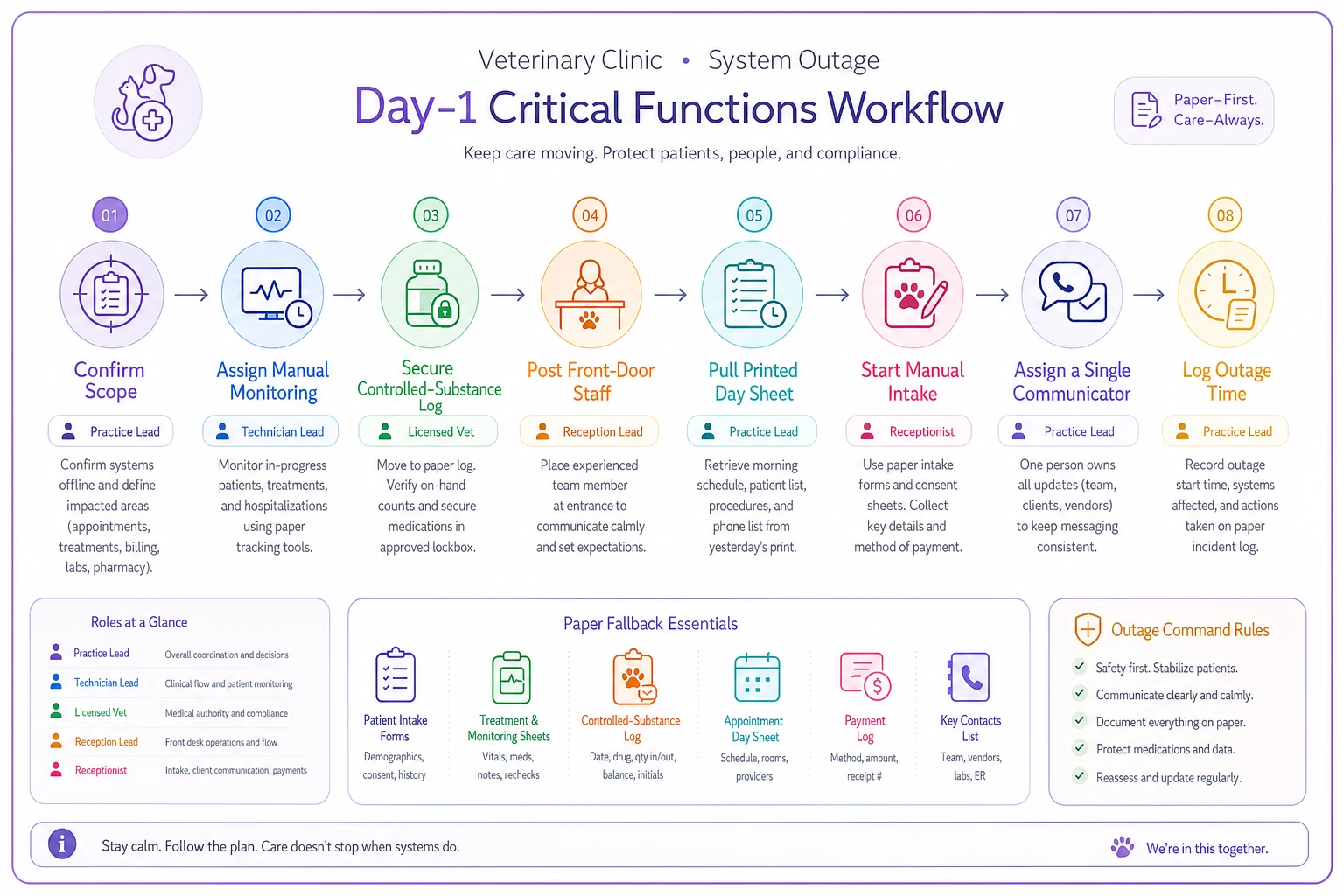
Use this flowchart during the first hour to keep roles clear and paper processes moving.
The clinics that get through outages cleanly almost always have one thing in common: the paper materials are already printed, labeled, and sitting in a known location. The ones that struggle are hunting for a blank order form in a shared drive they can't access because the drive is the thing that's down.
Manual Fallback Templates That Actually Work on Paper
Your fallback forms need to be usable by a stressed tech with a clipboard, not a beautiful PDF that assumes autofill.
Paper medication log. At minimum: patient name, owner last name, drug, concentration, dose, route, time given, and initials. For anything controlled, add quantity drawn, quantity administered, and quantity wasted with a witness signature. Keep it simple enough that nobody skips a field because they're rushing.
Paper treatment/order sheet. One patient per sheet. Problem, orders, and a running timeline down the page. The reason one-patient-per-sheet matters: when you re-enter everything into the system later, you can hand out sheets to multiple people to key in simultaneously. Combined order sheets become a bottleneck during recovery.
Paper intake/exam form. Owner contact, reason for visit, consent checkbox, and a wide blank space for the exam. Don't over-engineer it. The goal is capturing enough that the visit is clinically and legally sound, not replicating your full EMR on paper.
Lab sample tracking slip. This is the one clinics forget. When your routing software is down, samples still need labels and a chain of custody, or you'll have orphaned specimens the next morning with no idea which patient they belong to. The discipline here mirrors what we've covered in standardized lab collection, labeling, and result-routing — the manual version just moves that same tracking logic onto paper.
One detail that saves hours: number your paper forms and keep a simple log of which form numbers were used during the outage.
When you reconcile back into the system, you have a checklist of exactly how many records need re-entry. Without it, the most common recovery failure is a handful of paper records that never make it into the digital chart — and those are the ones that surface three weeks later when the client calls about their pet's bloodwork.
What Goes Into the Back-Up Record — and Why It Matters Later
An outage isn't just an operational problem, it's a records-integrity problem. Every manual entry eventually has to merge into the permanent chart, and merging sloppily creates gaps that can bite you in an audit or a liability dispute.
-
Timestamp everything on paper, including the outage start and end.
-
Keep the original paper even after re-entry — scan it and attach it to the chart rather than tossing it.
-
Mark re-entered records clearly so it's obvious they came from a manual period.
-
Reconcile within 48 hours while memories are fresh.
This is your normal records discipline applied under stress. If your data governance for medical records is already solid on normal days, the manual period is far easier to fold back in. Clinics with loose record habits tend to find the outage exposes every weak spot at once.
Communication Scripts: Say the Right Thing in the First Five Minutes
Silence is what damages you during an outage. Clients don't actually mind a short wait — they mind feeling like nobody knows what's going on. Have the scripts written so your front desk isn't improvising.
For a client in the lobby: > "We're running on a temporary backup process this morning, so check-in is a little slower than usual. Your pet's care isn't affected at all — we're just writing things down by hand for a bit. Thanks for bearing with us." For the phones: > "We're open and seeing patients. We're having a short technical issue so I can't pull up your records this second, but I can take your info down and we'll confirm everything shortly. What's the pet's name and the reason for the visit?" For a client whose results or records you can't access: > "I don't want to give you half-information from memory, so I'd rather call you back today once our system is back up and I can read you the exact results. Is this the best number?" Internal staff script (sent by the single designated communicator): > "System is down as of [time]. We're on paper protocol. Tier 1 and Tier 2 functions continue — see the posted sheet. Tier 3 paused. Questions to [name] only. Updates every 30 minutes."
That last line matters more than it looks. The "updates every 30 minutes" commitment stops the whole team from repeatedly interrupting whoever is managing the crisis just to ask if it's fixed yet.
Supplier and Vendor Contingencies
Outages aren't always internal. Sometimes it's your distributor that goes down, a lab that can't receive samples, or a payment processor that's offline. The clinics that handle this well have secondary options identified before they need them.
-
Pharmacy/distributor Know your secondary supplier account number and the minimum order for a same-day or next-day emergency delivery. Keep a short list of which critical meds you'd source locally from a human pharmacy in a true pinch.
-
Reference lab Have the courier's direct line and a backup drop-off location. If results can't come back electronically, know the phone-result process.
-
Payment processing Keep a manual card imprinter or a simple "pay on next visit" protocol with written IOU slips. Losing an hour of payment capture is survivable; turning away paying clients because you can't take a card isn't.
-
IT/PMS vendor Have the real support escalation number — not the general queue — and your account and contract details printed. Mid-outage is the worst time to be searching your email for a login you can't reach.
The vendor relationships that matter in a crisis are the ones where you already have a named human contact. Generic support portals are close to useless when you need something resolved in the next 30 minutes.
Financial Triage: Don't Let an Outage Become a Cash Problem
Beyond the clinical side, outages quietly leak money. Payment capture breaks, invoices go un-rendered, and services get performed but never charged because the record wasn't in the system. The recovery period is where revenue actually disappears.
-
Capture charges on paper per patient — same discipline as the treatment sheet. Every service, even if you can't invoice it yet.
-
Flag every manual-period visit for a billing review once systems return.
-
Reconcile paper charges against re-entered records before you consider the day closed.
-
Review any skipped deposits or pre-auths that would normally happen automatically.
A realistic scenario
A three-DVM small-animal practice lost its PMS and internet for most of a morning after a fiber cut in the area — roughly four hours. They saw about 18 patients during the outage on paper. Because they had a numbered paper-charge log and reconciled the next day, they recovered all but a couple of minor line-item charges. A comparable clinic down the road with no charge-capture sheets estimated they never billed somewhere around $600–$900 of services from that same morning — mostly small stuff, a nail trim here, an injection there — that simply never made it into anyone's memory by re-entry time. Same outage, very different financial outcome, entirely because one had a paper money-trail and the other didn't. The lesson isn't complicated. If you don't write it down during the outage, it's probably gone.
Test the Plan — Or It Isn't a Plan
A continuity plan that's never been rehearsed fails in exactly the places you didn't anticipate. You don't need an elaborate drill, just a cadence.
-
Quarterly A 30-minute tabletop. Pick a scenario ("PMS is down, 8 appointments booked") and walk the roles verbally. Who does what?
-
Twice a year A real paper-mode hour. Run actual check-ins on paper for part of a slow afternoon. This is where you find out your paper forms are missing a field or the printed day-sheet habit lapsed three months ago.
-
Annually Test your actual backups — confirm you can restore data, not just that a backup "ran." A backup you've never restored is a hope, not a safeguard.
-
After any real incident A short debrief. What slowed us down? What was missing from the drawer?
Clinics that run the twice-yearly paper hour are consistently calmer during real outages, simply because the team has done it before. The forms are familiar, the roles are muscle memory, and nobody freezes.
The debrief after a real incident is easy to skip because everyone's tired and relieved it's over. Don't skip it. That's when the gaps are freshest and easiest to fix.
When a Full Continuity Plan Is Overkill — and When It Isn't
A solo practitioner with a part-time receptionist doesn't need a 40-page binder. But even the smallest clinic needs three essentials: a printed daily schedule, a paper medication and controlled-substance log, and a one-line communication script. That's the floor.
Where a fuller plan genuinely earns its keep: multi-DVM practices, anywhere running anesthesia and surgery daily, clinics with meaningful controlled-substance volume, and any practice where an outage would strand patients mid-procedure. If losing your systems for four hours would create a clinical safety risk — not just an inconvenience — you've already answered whether you need this. The practices that shouldn't over-invest here are the ones still missing basics: no nightly backup, no printed schedule, no paper log. Building an elaborate continuity plan on top of shaky fundamentals is wasted effort. Fix the floor first, then layer on the rest.
The One Habit That Makes Everything Else Work
If you take a single thing from this: print tomorrow's schedule at the end of every day, and keep a stocked outage drawer. That drawer holds your paper forms, a printed vendor-contact sheet, the communication scripts, and a controlled-substance log. It costs almost nothing and it's the difference between a chaotic morning and a manageable one.
A veterinary clinic business continuity plan doesn't fail because the ideas are complicated. It fails because the paper wasn't printed, the roles weren't assigned, and nobody had rehearsed it. Decide your tiers, stock the drawer, write the scripts, and run the drill twice a year. When the system actually goes down — and over a long enough timeline, it will — you'll be the clinic that kept seeing patients while everyone else stood around waiting for the screen to come back on.
A veterinary clinic business continuity plan doesn't fail because the ideas are complicated. It fails because the paper wasn't printed, the roles weren't assigned, and nobody had rehearsed it. Decide your tiers, stock the drawer, write the scripts, and run the drill twice a year. When the system actually goes down — and over a long enough timeline, it will — you'll be the clinic that kept seeing patients while everyone else stood around waiting for the screen to come back on.
Ready to elevate your clinic’s efficiency?
Join 500+ veterinary clinics using Veterinaryly to save time, reduce administrative overhead, and improve patient care.