

Most clinics don't get breached because a hacker cracked some sophisticated firewall. They get breached because a receptionist reused the same password across the practice management system, the payment terminal login, and her personal Gmail — and one of those got dumped in a data leak two years ago. Or because the "IT guy" who set up the network moved states in 2021 and nobody has admin credentials anymore. Or because the practice manager clicked a fake DocuSign that looked exactly like the one the reference lab actually uses.
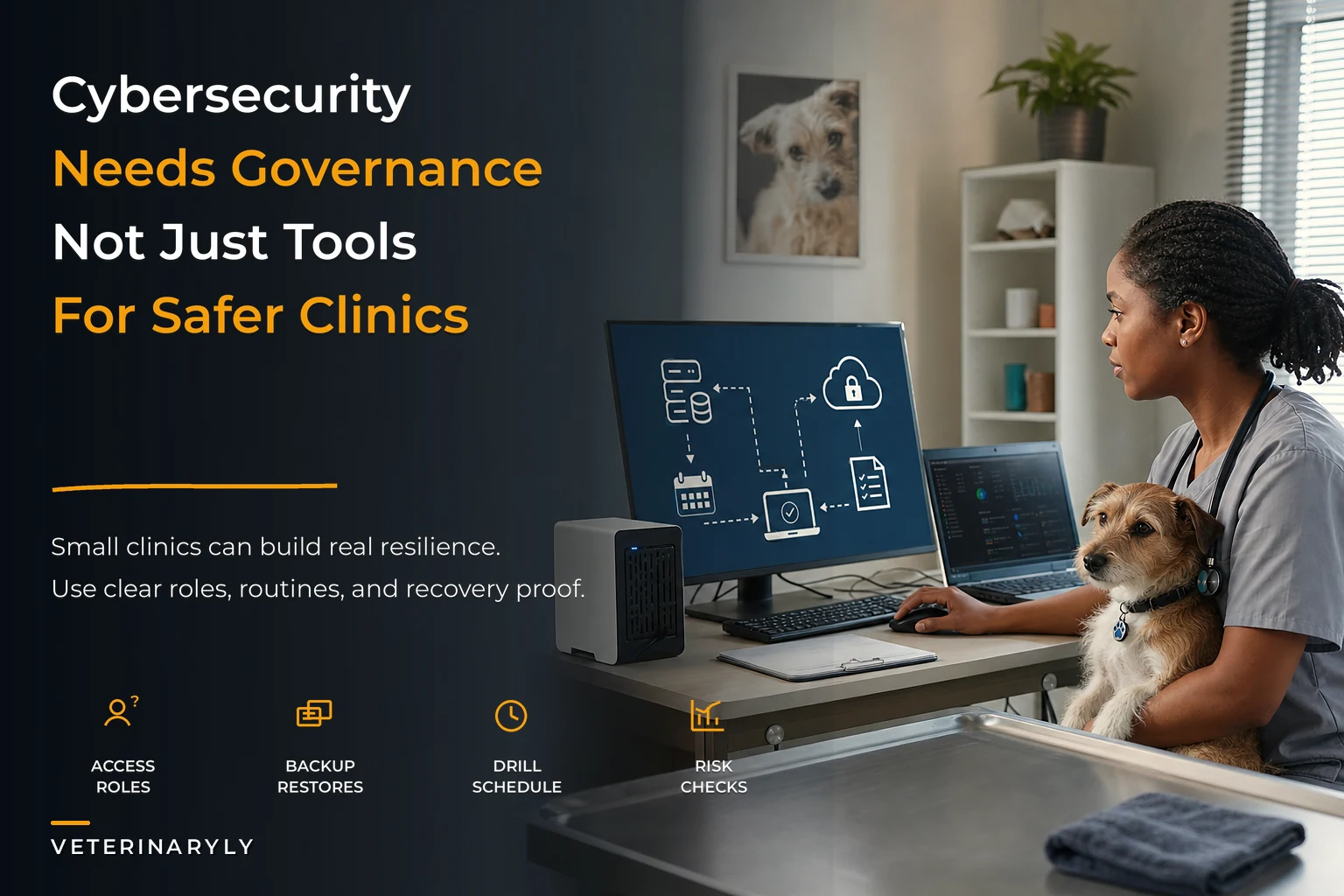
Veterinary clinic cybersecurity governance isn't really about technology. It's about who has access to what, who reviews it, how fast you can recover, and whether your team can recognize a threat when it lands in the inbox at 4:45pm on a Friday. Those are operational questions, and they scale (or collapse) exactly the way every other clinic system does.
This is the whole-system view — how the pieces connect, where they break as you add staff and locations, and what a defensible setup actually looks like for a practice that doesn't have a dedicated security team.
Why clinics are soft targets (and don't realize it)
A single-doctor practice thinks it's too small to be worth attacking. That's backwards. Small clinics are attractive precisely because security is loose, ransomware payouts are more likely (you can't run appointments without your records), and there's rarely anyone monitoring for intrusion. The attacker doesn't care that you only see 40 patients a week. They care that your practice management system, imaging archive, and payment processing all live on machines protected by a shared password taped to the monitor.
The other thing that makes clinics vulnerable is the sheer number of connected vendors. Think about everything that touches your data: the practice management software, the reference lab portal, the imaging PACS, the pharmacy system, the payment processor, the online booking widget, the reminder/text platform, the accountant's remote access, maybe a telehealth tool. Each one is a door. Each vendor has its own login, its own security posture, its own breach history. Your clinic's real attack surface is the sum of every vendor you've ever integrated — most of which nobody has reviewed since signup.
And the quiet part that often gets overlooked: the data you're protecting is more sensitive than most owners assume. Client names, home addresses, phone numbers, payment cards on file, sometimes financing applications with SSNs. Some states now regulate this the same way they'd regulate any small business holding personal data, and breach-notification laws don't exempt you for being a vet.
The four systems that actually matter
Forget the 200-item compliance checklists floating around online. For a small clinic, governance comes down to four connected systems: access control, audit cadence, backup/restore, and human threat response. When one is weak, it undermines the others. Tight backups don't help if an attacker has admin access and deletes them too. Perfect access control does nothing if your staff hands over credentials to a convincing phishing email.
Never miss a pet’s appointment again.
Veterinaryly helps you schedule, confirm, and manage every appointment and patient record effortlessly.
- Centralized appointment & patient management
- Automated client reminders
- Staff scheduling & task tracking
No credit card required
1. Role-based access: stop giving everyone the keys
The single most common failure is that everyone in the clinic logs in as an admin, or worse, shares one login. It feels efficient. Nobody wants to wait for a password reset when a client is standing at the counter. So the practice ends up with three logins for a team of eleven, all with full permissions.
The problem shows up in two ways. First, you can't tell who did what — which matters enormously when a controlled-substance record gets altered or a refund goes to the wrong card. Second, when a person with a full-access login leaves (or gets phished), the attacker inherits the entire clinic.
Role-based access means permissions map to jobs, not people, and definitely not to a shared account. A basic tiered model for a small clinic:
| Role | Can access | Cannot access |
|---|---|---|
| Front desk / CSR | Scheduling, client contact info, invoicing, payment intake | Financial reports, user management, controlled-substance logs, system settings |
| Technician / assistant | Medical records, lab/imaging orders, treatment notes | Payroll, banking, admin config, vendor credentials |
| Veterinarian | Full clinical records, prescribing, controlled-substance logs | Payroll/banking (unless owner), user provisioning |
| Practice manager | Reports, scheduling config, user management, vendor portals | Depends — often full except banking |
| Owner / admin | Everything, including who gets access to what | — |
The rule that makes this real: least privilege by default. New hires start with the minimum their role needs. You add access when there's a demonstrated reason, not proactively "just in case." And access gets removed the same day someone changes roles or leaves — not "eventually," not "when we remember." A departed employee whose login still works two months later is one of the most common findings in any clinic security review.
This connects directly to record integrity. If you've built any kind of structured medical-records discipline — the sort of thing covered in Data Governance for Veterinary Medical Records — role-based access is what makes those audit-ready notes trustworthy. A record you can't attribute to a specific verified user is a record a lawyer can poke holes in.
2. Audit-log cadence: reviewing before you need to
Every practice management system worth using logs activity. Almost nobody looks at those logs until after something goes wrong — at which point they're doing forensics, not prevention.
Audit cadence means someone actually reviews access and activity logs on a set schedule. Not obsessively. Not daily. But on a rhythm that would catch the obvious stuff before it becomes a disaster.
-
Weekly (5 minutes) Practice manager scans for failed login spikes, logins at strange hours, and any access from unrecognized devices or locations.
-
Monthly (20 minutes) Review the full user list. Does everyone on it still work here? Does everyone's access level still match their job? Any dormant accounts?
-
Quarterly (1 hour) Review vendor access, remote-access accounts (accountant, IT contractor), and permission changes made in the last three months.
The point of audit review isn't to catch the sophisticated attacker mid-hack. It's to catch drift. Access accumulates. Someone gets temporary permission for a project and it's never removed. A vendor's support account stays active for a year after the contract ended. A tech becomes a lead and gains admin but the old restrictions never get reset. Audit cadence is how you fight entropy — and entropy is what actually gets clinics breached.
Put the weekly, monthly, and quarterly reviews on a shared calendar with owners and managers so they actually happen.
3. Backup and restore: the part everyone gets half-right
Almost every clinic backs up. Almost no clinic tests restores. That gap is where ransomware turns from an inconvenience into a business-ending event.
The pattern plays out like this: the clinic has automatic cloud backup — great. Ransomware hits. They go to restore, and discover the backup has been silently failing for eleven weeks because a storage quota filled up and nobody got the alert. Or the backup restored fine, but it's a database file nobody knows how to reload into the practice management software, so now they're on a support call with the vendor while the phones ring off the hook.
-
Follow the 3-2-1 idea loosely three copies of critical data, on two different types of storage, one of them off-site and disconnected. For most clinics that's: the live system, a local backup, and a cloud backup.
-
One backup must be offline or immutable. Ransomware specifically hunts and encrypts connected backups. If yours is always mounted and reachable, it can be encrypted too. Immutable cloud storage (where files can't be altered for a set period) solves this.
-
Test a restore quarterly. Actually pull a backup and confirm you can bring records back. Write down how long it took. That number is your real recovery time — the one you'll be quoting to a panicking staff during an outage.
-
Document the restore steps so it isn't locked in one person's head. If the only person who knows how to restore is on vacation, you don't have a backup system — you have a backup file.
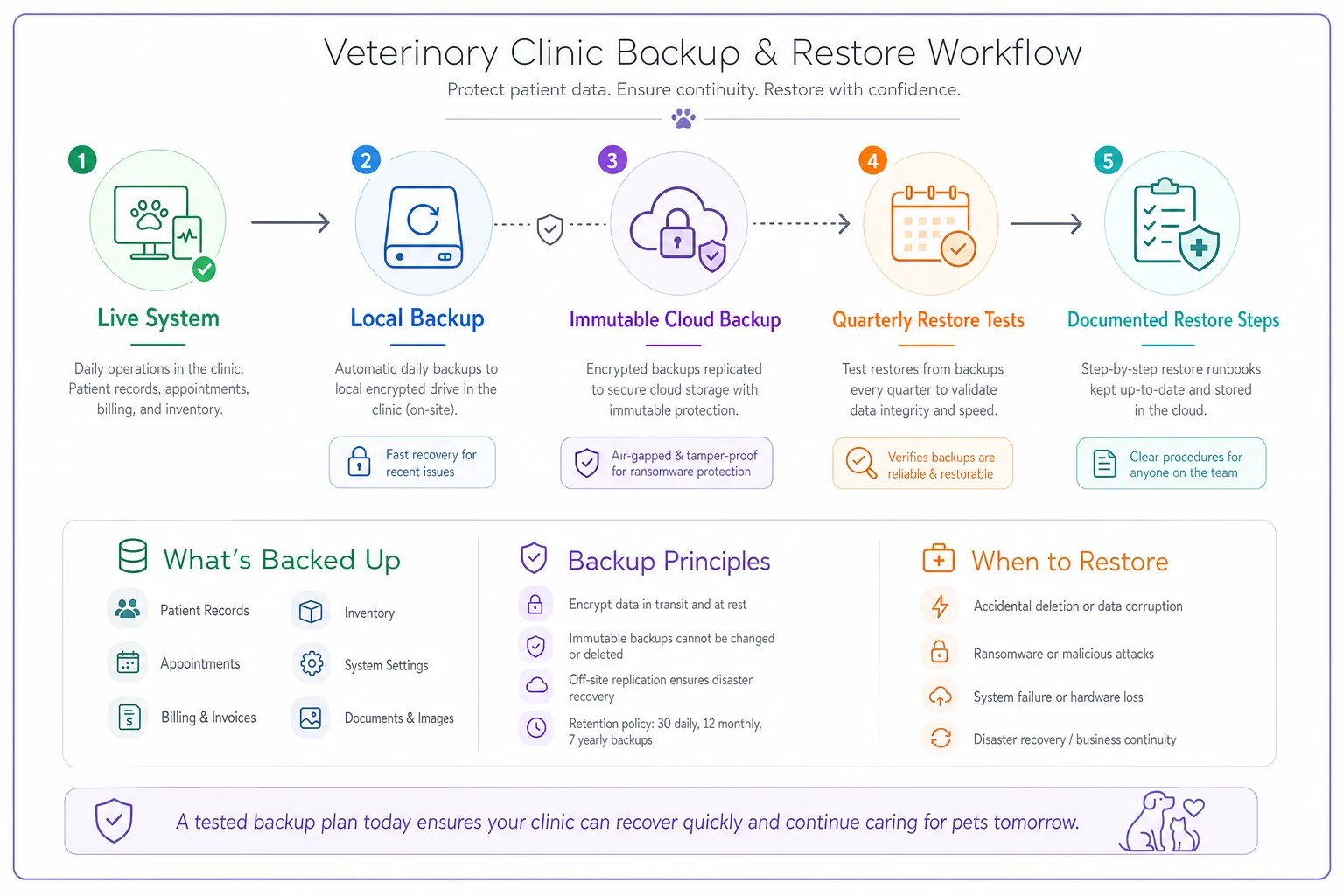
This illustrates a simple backup and restore workflow a small clinic can implement.
Backups aren't an IT task sitting off to the side. They're tied to your whole records lifecycle. If your practice stores photos on one device and notes in another, your backup only captures part of the picture. Consistent operations produce backable data. Messy operations produce backups full of gaps you won't discover until restore day.
4. Human threat response: your team is the firewall
You can lock down access, review logs regularly, and test restores monthly — and still get wrecked because a tech clicked a link. The majority of real clinic incidents start with a person, not a system. Phishing, fake invoices, "your account is suspended" texts, someone calling pretending to be your software vendor's support line.
Training doesn't mean a one-time slideshow at onboarding. It means a repeatable, low-effort rhythm that keeps recognition sharp. A practical phishing-awareness cycle:
-
At onboarding A short session on the specific threats clinics see — fake lab result notifications, fake DocuSign/e-signature requests, spoofed vendor invoices, gift-card scams targeting the practice manager "from the owner."
-
Quarterly A five-minute refresher, ideally with a real example that hit a nearby practice or came through your own inbox.
-
Ongoing A dead-simple reporting path. One button, one email address, one Slack channel — wherever staff can forward "does this look weird to you?" without feeling dumb for asking. The clinics that resist breaches best are the ones where asking is normal and fast.
Your staff's judgment is the layer that catches what technology misses. The receptionist who pauses and thinks "wait, why is the lab asking me to log in through this link when I always use the bookmark?" just prevented a breach. Build a culture where that pause is rewarded, not rushed past because there's a client waiting.
What breaks as you grow
A one-location, six-person clinic can run governance informally and mostly get away with it. The owner knows everyone, sees every login, and can fix problems by walking across the room.
Add a second location and everything changes. Now you have staff who never meet, systems accessed remotely, and no single person watching the whole picture. The failure points multiply:
-
Access sprawl across locations, where nobody's sure which permissions exist where.
-
Inconsistent practices — one site tests backups, the other doesn't; one site trains staff, the other never got around to it.
-
Slower incident detection because there's no unified view of activity.
-
Vendor duplication — each location signs up for its own tools, tripling your attack surface without anyone deciding to.
This is the same coordination problem that shows up everywhere in multi-site operations, and it's why clinical consistency work — the kind covered in Turn Clinical Variation into Predictable Outcomes — applies just as much to security. Standardized systems that hold up across locations are the whole game once you pass a single site. Security governance that only exists in the owner's head doesn't survive expansion.
Tabletop drills: rehearsing the bad day
An exercise almost no small clinic does and every one should: a tabletop incident drill. It's not technical. It's a 45-minute conversation where you walk through a realistic scenario out loud and find out where your response falls apart.
Run it like this:
-
Pick a scenario. "It's Monday morning. The practice management system won't load and there's a ransom message on the front-desk screen."
-
Walk through the first hour. Who do you call first? Do you have your PMS vendor's emergency support number written down somewhere offline? Do you disconnect machines from the network, and does anyone know how?
-
Test your assumptions. How do you run appointments today with no system? Do you have a paper fallback? Where's the client contact list if the digital one is locked?
-
Find the gaps. Every drill surfaces something. "Nobody knows the admin password." "Our backup is on the same network the ransomware would reach." "We have no way to text clients that we're down."
-
Write down the fixes and assign each one an owner and a date.
The value isn't the drill itself. It's discovering, in a calm room over coffee, that your recovery plan has three holes in it — instead of discovering that during an actual attack with a lobby full of anxious pet owners.
A quick vendor-vetting checklist
Before you connect any new tool to your clinic data, run it through a short gate. This doesn't need to be a security audit — just enough to avoid the obvious mistakes:
-
Do they support individual user logins, or just one shared account? (Shared-only is a red flag.)
-
Do they offer role-based permissions?
-
Can you export your own data if you leave? (No export = hostage.)
-
Do they encrypt data in transit and at rest?
-
Have they had a public breach, and how did they handle it?
-
Do they offer two-factor authentication? Is it enforceable for your team?
-
What's their support response time when something goes wrong at 5pm?
-
Who at your clinic owns the admin account, and is that documented?
You don't need every answer to be perfect. You need to make an informed choice instead of clicking "sign up" and adding another unreviewed door to your building.
Real scenario: a three-doctor practice tightens up
A three-veterinarian small-animal practice — around 55 appointments a day, roughly a dozen staff — ran the way most do. Two shared logins for the whole front desk. Automatic cloud backups nobody had ever restored from. No audit review. Staff trained on security exactly once, at hiring.
The wake-up call was a near-miss: the practice manager almost wired a "vendor payment" to a spoofed email that copied their real imaging supplier's format down to the logo. She caught it because the account number looked off. That was luck, not process.
Over about two months, they made changes that weren't expensive, just deliberate. Individual logins for every staff member with role-based permissions. A monthly 20-minute user-list review added to the practice manager's calendar. One immutable cloud backup alongside the existing one, plus a documented restore test — which, on the first attempt, took nearly four hours and revealed two people needed to be involved to complete it. A quarterly five-minute phishing refresher. One tabletop drill that surfaced the fact that nobody had the PMS emergency line written down anywhere offline.
Nothing dramatic happened afterward — which is the point. But six weeks in, a staff member forwarded a convincing fake lab-result email to the practice manager instead of clicking it. The reporting habit had taken. The cost of the whole effort was mostly time and a modest bump in their cloud storage bill, somewhere around an extra $30–50 a month. Against a ransomware event that could have shut them down for days and cost tens of thousands, that math isn't close.
When lightweight governance is enough — and when it isn't
A solo practice with one or two staff and a single well-configured cloud PMS can keep this genuinely simple: individual logins, two-factor everywhere, one tested backup, and basic phishing awareness. Over-engineering security for a two-person clinic wastes energy better spent on patients.
But you've outgrown informal governance the moment any of these are true: you have more than a handful of staff, you operate more than one location, you store payment cards or financing applications, or you've integrated more than a few outside vendors into your systems. At that point, "the owner keeps an eye on it" stops being a control and starts being a liability.
The clinics that get this wrong usually aren't the ones who did nothing — they're the ones who did half. They backed up but never tested. They set up logins but never reviewed them. They trained staff once and called it handled. Security governance is a rhythm, not a project. It's the weekly five minutes, the monthly review, the quarterly restore test, the annual drill. Boring, repeatable, and exactly the kind of operational discipline that separates a clinic that recovers from a bad day from one that doesn't reopen.
Your records, your clients' trust, and your ability to see patients tomorrow all sit on the same foundation. Build it like it matters, because when it fails, everything else in the practice fails with it.
Ready to elevate your clinic’s efficiency?
Join 500+ veterinary clinics using Veterinaryly to save time, reduce administrative overhead, and improve patient care.