


Most clinics don't have a veterinary records retention policy. They have a storage habit. There might be a binder in the manager's office that says "keep medical records for X years," but in practice everything digital stays forever by default, paper goes to a storage unit or back closet when the shelves fill up, and nobody deletes anything because nobody is sure they're allowed to.
That feels safe, but it isn't. "Keep everything" has real costs, and they stay hidden until something goes wrong: a board complaint, a demand letter from an angry owner, an employee claim, a ransomware event, or an acquisition where the buyer's team asks for your retention schedule and you have nothing to hand over.
The opposite failure happens too, usually right after a server upgrade or a PMS migration. Someone decides to "clean up," and records that should have been kept get wiped along with the junk. Or the security cameras quietly overwrite the footage from the night a tech got bitten, which was the one piece of evidence that mattered.
This article is organized around the mistakes, because that's where retention programs actually fail. The fixes come after, as a system: a retention map, archival rules, a legal hold procedure, and an audit cadence someone can run without a law degree.
One caveat first. Retention periods for veterinary medical records are set mostly at the state level, and they vary. Controlled substance records have federal minimums plus state rules on top. Employment and tax records run on their own clocks. Nothing here replaces checking your state veterinary practice act and talking to your attorney or accountant. The point is the operational machinery, so that whatever periods you confirm actually get enforced.
Mistake #1: Treating "the medical record" as one thing
Most retention policies have one line about medical records and then stop. But the "medical record" is really a dozen record types, created by different systems, owned by different people, and governed by different rules.
Take one dental patient. What exists for that visit?
-
SOAP notes and the treatment plan in the PMS
-
The signed estimate and the anesthesia consent
-
The anesthesia monitoring log, possibly from a standalone monitor that exports a PDF
-
Dental radiographs living in a separate imaging system
-
Pre-op bloodwork sitting in a reference lab portal and imported into the PMS
-
Controlled drug entries in the CS log
-
Intraoral photos, possibly taken on a tech's phone
-
A text thread with the owner about pickup time and a post-op concern
-
A recorded phone call where the owner asked about pain meds
Every one of those is a record. Some clearly belong to the legal medical record. Some arguably do, like the text thread where the owner said the patient wasn't eating. Some are separate regulated records, like the controlled substance log. A single "medical records: keep 5 years" line tells nobody what to do with any of them except the SOAP note.
The PMS-native data is usually fine, mostly because it never gets deleted. The risk sits in the satellite systems: imaging archives, lab portals, phone systems, texting platforms, camera DVRs. Each has a default retention the vendor picked, and nobody at the clinic chose it. Some texting platforms purge message history after a set period. Some phone systems keep call recordings for 30 or 90 days unless you pay for more. Most DVRs overwrite in two to four weeks.
If you've already worked on note quality and documentation standards (we covered that lifecycle in our piece on data governance for veterinary medical records), retention is the next layer. Good notes don't help if the radiograph they reference is gone.
Mistake #2: Starting the retention clock from the wrong event
This one is subtle and causes a lot of quiet non-compliance.
Never miss a pet’s appointment again.
Veterinaryly helps you schedule, confirm, and manage every appointment and patient record effortlessly.
- Centralized appointment & patient management
- Automated client reminders
- Staff scheduling & task tracking
No credit card required
Many state rules tie medical record retention to the last date of service or last visit, not the date the record was created. A note written in 2017 for a dog who still comes in every year never ages out, because the patient is still active. The whole file is one continuous record.
Clinics that set retention by creation date, or let a vendor's "archive records older than X years" feature run, can end up archiving or purging parts of an active patient's history. Then a vet pulls up a 12-year-old cat with a vague "history of reaction to something" and the original anesthesia note is gone.
-
Deceased patients
the clock usually starts at date of death or last service. Clinics often forget to mark patients deceased properly, especially when a pet dies at home or at an ER. Those records sit in "active" status forever, so they never become eligible for archival.
-
Employee records
the clock often starts at termination, not hire. An I-9, for example, has a rule based on hire date and termination date, whichever runs later.
-
Controlled substance records
these usually run from the date of the record or inventory itself.
-
Financial records
these usually run from the tax year or the filing date.
Retention isn't a number. It's a number plus a trigger event. If your system can't tell when the trigger happened, it can't calculate when retention ends, and that's a big part of why clinics fall back on keeping everything. They aren't being cautious. They just don't have the data to make the call.
Mistake #3: The policy governs the system, but the copies live elsewhere
Say your PMS retention is configured perfectly. The record still exists in:
-
The email you sent the referral hospital with the full history attached
-
The shared drive folder where someone saved exported lab PDFs "for easy access"
-
The front desk's downloads folder
-
A USB drive in the X-ray room from the last imaging migration
-
Three personal phones with clinical photos on them
-
The old PMS server that's still under a desk because "we might need something from it"
That last one deserves its own mention. Legacy systems left running after a migration are one of the most common retention problems in small clinics. They hold years of client PII and medical data, usually on an unpatched operating system, often with a shared login. Nobody owns them, nobody knows exactly what's on them, and they can't be deleted because nobody verified the migration was complete. One clinic migrated PMS platforms around 2019, kept the old server "for about six months," and was still powering it on in 2024 whenever someone needed a pre-2019 radiology report that never carried over.
Copies create two kinds of exposure. If you're keeping records past their retention period, every copy is discoverable in a dispute and every copy is breach exposure. If you're under a legal hold, every copy is potentially in scope, and you can't preserve what you don't know exists.
Phones are the worst offender for images. If you haven't nailed down where clinical photos live and how they're tagged, start with clinical photography standards and metadata rules. A retention policy can't govern photos that only exist on someone's camera roll.
Banning copies doesn't work, so don't bother. Designate a system of record for each record type and treat everything else as a convenience copy with a short life, ideally 30 to 90 days, enforced automatically where possible.
Mistake #4: Legal hold that exists only as an email
A clinic gets a demand letter or a board complaint, and the response is an email from the owner to the manager: "Don't delete anything about the Johnson dog." That's the whole legal hold.
From there, things tend to go sideways:
-
The email never reaches the person who manages the phone system, so call recordings from the week in question roll off on their normal schedule.
-
The DVR overwrites the lobby footage from the day of the incident.
-
A tech involved in the case leaves three months later, and their email account is deleted during offboarding per standard IT practice.
-
The hold never gets released. Two years later nobody remembers why "Johnson" records are flagged, so the clinic keeps them forever, along with everything else nobody was sure about.
A legal hold has to do three things: identify scope (which patients, clients, employees, date ranges, and systems), suspend deletion across every system in scope, and get released formally when counsel says the matter is closed. An email does none of those reliably.
Clinics also trigger holds too late. The duty to preserve can arise when litigation is reasonably anticipated, not when papers are served. Ask your attorney where that line sits for you. Operationally, these are worth treating as hold events:
-
Demand letters or attorney contact
-
State board complaints
-
An owner explicitly threatening to sue or "report you," even on social media
-
Disputed euthanasia, cremation, or remains-handling cases
-
Employee injury claims and workers' comp filings
-
EEOC or state agency charges from employees
-
Insurance claims where causation is disputed
-
Any incident involving a controlled substance discrepancy
Not every angry Google review needs a formal hold. A review that names a specific death and says "my lawyer will be in touch" probably does.
Mistake #5: Destruction with no evidence, and archives nobody can open
Two related failures sit at the end of the lifecycle.
Destruction without a log. A clinic shreds four boxes of 2011–2013 charts. Good, they were past retention. But nobody wrote down what was destroyed, when, under what policy, or by whom. If a record request comes in later, the clinic can't show the records were destroyed in the normal course of business, and that looks very different from records that are simply missing. A destruction certificate from the shredding vendor plus an internal log listing the record range is the minimum.
Archives in formats nobody can read. Archival is supposed to mean "moved out of the active system, still retrievable." Often it means "exported to a format that needs software we no longer license." Old imaging archives are the classic case: proprietary formats, or DICOM files with no viewer installed anywhere in the building. A record you can't produce in a reasonable time is, in practice, a lost record.
Here's what that costs. A practice gets a records request tied to a dispute and needs about 30 radiographs from roughly six years earlier. The images are on an external drive from the old imaging system, but the viewer software is gone. They pay their IT contractor somewhere around $1,500 over two weeks to stand up a temporary environment, extract the images, and convert them, while the request deadline keeps sliding. A five-minute test retrieval once a year would have caught it.
What changes as the clinic grows
At a single-doctor practice with one PMS and a manager who's been there 15 years, retention barely registers as a problem. That manager is the retention system. She knows the boxes in the attic are 2009–2014, knows the old server has pre-2016 X-rays, knows to call the phone vendor if a call recording matters.
That works right up until she leaves.
As the practice grows, the failure points show up in a fairly predictable order.
Adding systems. Each new tool (texting, telemedicine, AI scribe, online pharmacy, cloud imaging) brings its own default retention, and nobody reconciles those defaults against policy. AI scribes are worth flagging specifically. Some keep the raw audio, some keep only the transcript, some keep both for a vendor-set period. That audio is a record of the exam conversation, so decide deliberately whether you keep it.
Adding locations. Two sites will develop two different habits within a year. One shreds annually, one never does. One marks deceased patients, one doesn't. When a corporate group or acquirer shows up, "we do it differently at each site" becomes a due diligence finding.
Staff turnover. Retention knowledge is tribal. When the person who knew where things lived leaves, the clinic defaults back to keeping everything, or worse, someone new "cleans up."
Ownership changes. When a practice is sold, custody of the pre-sale records often goes unaddressed operationally, even if the purchase agreement covers it. The seller assumes the buyer has them. The buyer assumes the old system is the seller's problem. Then a request comes in for a 2018 patient.
Data volume. Imaging and video grow fast. A clinic that adds digital dental radiography and CT can see storage needs climb sharply within a couple of years. "Keep everything" becomes a real line item, and backups slow down because they're copying years of data that should have aged out.
Retention that runs on one person's memory doesn't survive growth. It has to run on rules attached to the records themselves.
The retention map: the one document that makes everything else work
The core artifact is a retention map. It's a table listing every record type, its system of record, its retention trigger, its retention period (confirmed for your state), its archival rule, its owner, and whether it's typically in scope for legal holds.
Below is an example structure. The periods shown are placeholders and common reference points, not legal advice. Your state practice act, DEA and state pharmacy rules, employment law, and your accountant decide the real numbers.
| Record type | System of record | Retention trigger | Retention period (verify for your state) | Archival rule | Owner | Common hold scope? |
|---|---|---|---|---|---|---|
| Medical record (notes, plans, discharge) | PMS | Last date of service | State-specific; often 3–5+ years after last visit | Archive patient file 24 months after inactive/deceased status | Medical director | Yes |
| Diagnostic imaging (rads, CT, US) | Imaging system / PACS | Last date of service | Usually match medical record; some states specify separately | Move to cold storage after 2–3 yrs; annual retrieval test | Imaging lead | Yes |
| Reference lab results | PMS (imported copy) | Last date of service | Match medical record | Don't rely on lab portal as archive | Medical director | Yes |
| Signed consents & estimates | PMS / e-consent tool | Last date of service | Match medical record | Archive with patient file | Practice manager | Yes, often central |
| Controlled substance logs & inventories | CS log / PMS module | Date of record or inventory | Federal minimum 2 years; many states longer | Keep readily retrievable on-site per DEA rules | DEA registrant | Yes |
| Euthanasia, cremation & remains records | PMS + crematory paperwork | Date of service | Match medical record or longer (check policy) | Link crematory paperwork to patient file | Practice manager | Yes, frequently |
| Rabies certificates | PMS | Date of vaccination | Often longer than general records; check local rules | Never purge while tied to bite case | Medical director | Yes, in bite cases |
| Client communications (SMS, portal, email) | Comms platform → exported to PMS | Date of message | Match medical record if clinically relevant | Auto-export clinical threads to PMS | Client service lead | Yes |
| Call recordings | Phone system | Date of call | Often short (30–90 days) unless flagged | Auto-delete unless tagged to incident/hold | Practice manager | Sometimes |
| CCTV footage | DVR / cloud camera | Date recorded | Short rolling window | Export immediately on incident log | Practice manager | Yes, time-critical |
| AI scribe audio / transcripts | Scribe vendor | Date of visit | Clinic decision; often transcript only | Confirm vendor deletion setting | Medical director | Sometimes |
| Employee personnel files | HRIS / locked file | Termination date | Varies; commonly several years post-termination | Archive at termination | Owner / HR | Yes, in employment claims |
| I-9 forms | HRIS / separate file | Hire + termination | 3 yrs after hire or 1 yr after termination, whichever later | Keep separate from personnel file | Owner / HR | Sometimes |
| OSHA injury logs (300/300A/301) | Paper or HRIS | End of calendar year | 5 years | Annual archive | Safety lead | Yes |
| Radiation dosimetry reports | Badge vendor + local copy | Date of report | Employee exposure records can carry very long requirements (decades) | Never auto-purge; keep local copies | Radiation safety officer | Yes |
| Payroll & tax records | Payroll provider + accounting | Tax year / filing date | Commonly 3–7 years | Annual archive after filing | Owner / bookkeeper | Sometimes |
| Payment card data | Processor (not you) | N/A | Don't store full card data | Purge any stored numbers immediately | Practice manager | Rarely |
| Marketing consent / opt-outs | Comms platform | Date of consent/opt-out | Keep as long as you message that client, plus buffer | Never delete opt-outs early | Client service lead | Occasionally |
A few rows deserve a closer look.
Dosimetry is the one clinics miss most often. Radiation badge reports feel like a vendor thing, but employee exposure records can carry very long retention expectations, and badge vendors don't promise to hold your history forever. Download your reports and keep them locally.
CCTV is the only record type here where the main risk is retention that's too short rather than too long. The archival rule isn't really about archiving. It's a trigger: when an incident is logged, footage gets exported before the overwrite window closes.
Payment card data is on the list because some records should have zero retention at the clinic. If someone still writes card numbers on paper for phone payments, that's a different fire to put out.
How to build the map without stalling for six months
Clinics that try this tend to get stuck making the map perfect before using it. A usable version can come together in a few working sessions.
-
Inventory systems first, record types second. List every system that stores client, patient, employee, or financial data: PMS, imaging, labs, phone, texting, email, cameras, scribes, HR, payroll, accounting, shared drives, and any legacy servers. You'll find two or three you forgot.
-
For each system, find the vendor's current default retention setting. That takes a support ticket or a dig through admin settings. Write down what it actually does today, not what you assume.
-
List record types per system and pick one system of record for each. If lab results live in both the portal and the PMS, the PMS copy is the record and the portal is a convenience copy.
-
Assign the trigger event and get the period confirmed. Bring the draft to your attorney and accountant with the triggers already filled in. Review goes faster than starting from a blank page, and costs less.
-
Assign an owner per row. A named role, not "the team." Owners approve destruction and respond to holds for their rows.
-
Mark which rows can be automated now, which need manual steps, and which are blocked (for example, a phone system that can't selectively preserve calls). The blocked ones go on your vendor conversation list.
-
Publish it, date it, and schedule the first review. A map with a version date that actually gets reviewed beats a perfect map that sits in a draft folder.
A usable version can come together in a few working sessions.
Automation patterns that hold up
This is where retention moves out of a policy document and into daily operations. Nothing exotic is needed. Most of the useful patterns are plain rules applied consistently, which is exactly what people are bad at and software is good at.
Classify at creation, not at cleanup. Tag records with their type when they're created instead of trying to sort them years later. When a consent form is signed, it carries "consent / medical record class / trigger: last service date." When someone logs a workplace injury, it carries "OSHA / 5-year / calendar year." Retroactive classification of a decade of files is what stalls every retention project.
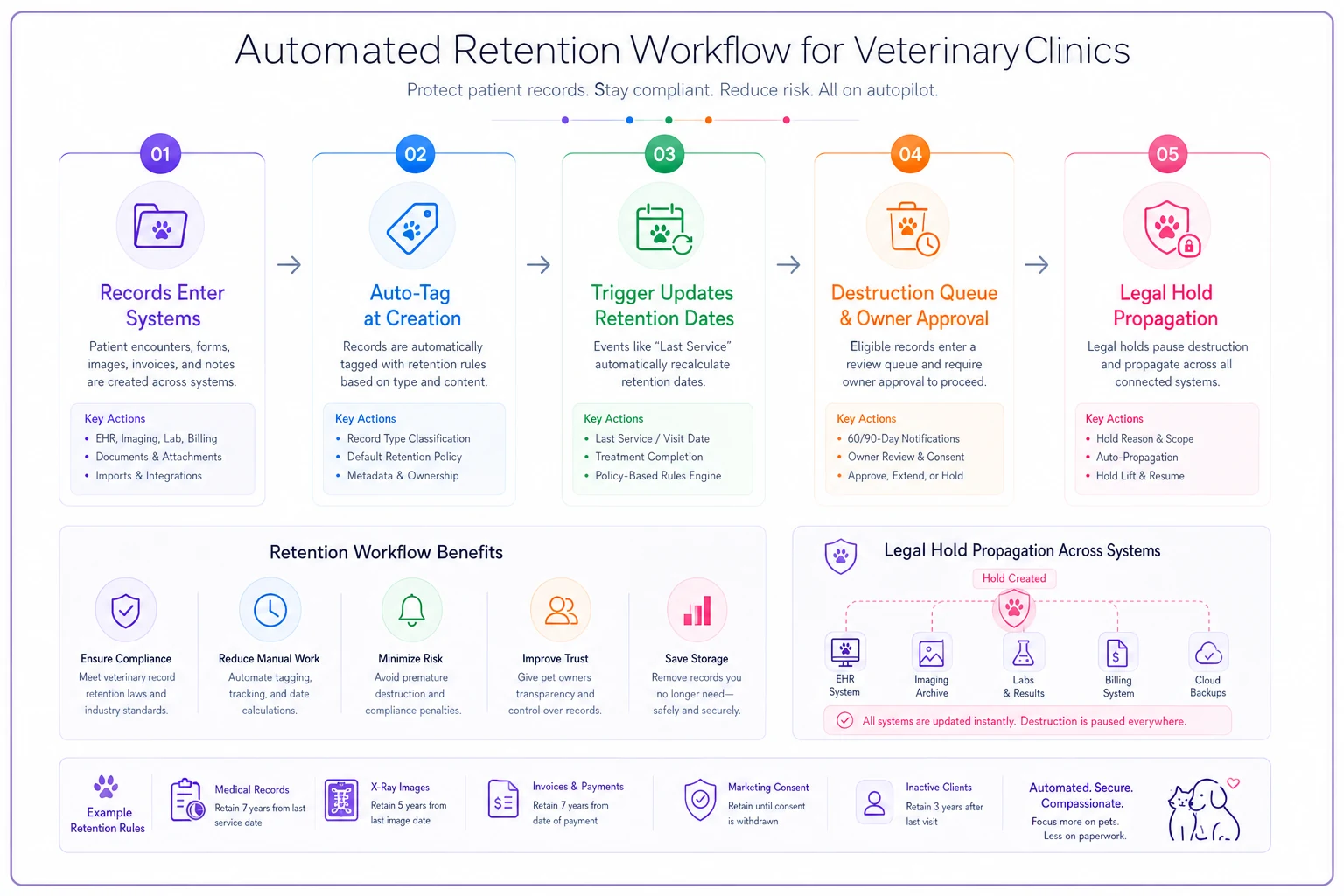
Compute the retention date from the trigger, and recompute when the trigger changes. If a patient comes back after three years inactive, the whole file's eligible date moves. If a patient is marked deceased, a new clock starts. The logic is simple, but it has to run continuously, and a spreadsheet won't do it.
Use a destruction queue, never auto-delete. For anything above trivial (meaning anything except convenience copies and short-lived recordings), the system should build a queue of records eligible for destruction and send it to the row owner for approval. Approved items get destroyed and logged. Rejected items get a reason and a new review date. That one pattern covers both the keep-everything problem and the someone-wiped-it problem.
Run the destruction queue approvals for high-volume classes (imaging, CCTV exports) first, so backlog clears quickly without risking critical records.
Holds override everything, and propagate. A legal hold flag on a patient should freeze that patient's notes, images, consents, communications, invoices, and linked records in every connected system, and pull them out of any destruction queue. A hold on an employee should block account deletion during offboarding.
Incident logs trigger preservation of short-lived records. When someone logs an incident (bite, fall, client altercation, drug discrepancy), the workflow should prompt or trigger an export of camera footage and call recordings for the relevant window. Clinics get caught here more than anywhere else, because the footage is gone in days, not years.
Convenience copies expire on their own. Shared drive export folders, download folders, and scratch directories get a 30–90 day auto-cleanup. People adapt fast once they know the folder empties itself.
Run archive retrieval tests on a schedule. Once a year, pick a handful of archived records across record types and open them. Time it. Fix whatever's broken while nothing is urgent.
AI-assisted operational platforms help most with the tedious middle: classifying incoming documents, noticing that a patient file has gone inactive, building the destruction queue, flagging records linked to a held patient that live in other systems, and nudging owners when reviews are overdue. The judgment calls stay with people: whether to approve destruction, how broad a hold should be, when to release it. A good setup makes those decisions quick and well documented. It doesn't make them for you.
How a legal hold should run
This is the piece that most often exists only in someone's head, so here it is start to finish.
It starts with a trigger. A demand letter arrives, a board complaint notice comes in, or an owner says in writing that they're pursuing action. Whoever receives it, often the front desk, logs it in one place under a "possible legal matter" category instead of forwarding it around by email. That log entry notifies the practice owner and the practice manager.
Within one business day, the owner or manager defines scope. Which client and patients? Which staff were involved? What date range, usually first relevant visit through today plus a buffer? Which systems hold relevant data: PMS, imaging, phone, texting, email, cameras, scribe, HR if staff are involved? Set scope a little wider than seems necessary. Narrowing later is easy, and recovering deleted data isn't.
Then apply the hold. The flag goes on in the PMS and anything connected to it. For systems that don't support holds natively, like many phone systems and DVRs, someone exports the relevant data to a preserved location and logs what was exported, when, and by whom. Each row owner confirms their systems are covered. That confirmation step is the one that gets skipped.
Next, notify custodians. Everyone who might have relevant information, including staff with texts on personal phones, gets a short written notice. It tells them not to delete anything related to the matter and to tell the manager if they have records outside clinic systems, and they acknowledge it. A tech who quietly clears their phone because they're nervous is a real risk, and it's usually not malicious.
While the hold is active, maintain it. New records about the patient or client stay in scope automatically. If an involved staff member gives notice, offboarding checks for active holds before any accounts are deleted. Holds get reviewed quarterly, and the owner confirms with counsel whether each is still needed.
Finally, release. When counsel confirms the matter is resolved and the preservation duty has ended, the hold is released in writing and logged. Records go back into normal retention. Some may now be past their period and will show up in the next destruction queue, which is fine. That's the system working.
Skipped custodian notices and holds that never get released are the two most common breakdowns. Unreleased holds pile up quietly and turn into another form of keep-everything.
Audit cadence: what gets checked, how often
Retention programs decay unless someone looks at them on a schedule. It doesn't need to be heavy: a monthly 20-minute review plus a couple of deeper sessions a year covers most of it.
Monthly
-
Review and approve or reject the destruction queue for each record class
-
Confirm any incidents logged that month had footage and recordings preserved
-
Check that patients reported deceased (including via ER or crematory notices) are marked deceased in the PMS
-
Clear or verify any expired convenience-copy folders
Quarterly
-
Review every active legal hold and confirm status with counsel
-
Spot-check five to ten records across different types to confirm classification and computed retention dates look right
-
Review the offboarding log
were holds checked before accounts were deleted?
-
Confirm controlled substance records are complete and retrievable for the required period
Annually
-
Re-confirm retention periods against current state rules (they do change)
-
Run the archive retrieval test across imaging, legacy systems, and paper storage
-
Re-check every vendor's default retention setting, since vendors change these in updates
-
Inventory systems again; anything new added this year needs a row on the map
-
Process paper destruction with vendor certificates and an internal log
-
Decide what happens to any legacy system still running, with a date
Event-driven (not on a calendar)
-
Any new software adoption
add rows before go-live, not after
-
Any PMS or imaging migration
verify completeness before decommissioning the old system, and document the verification
-
Any acquisition or ownership change
confirm custody of pre-transition records in writing
-
Any security incident
review what data was exposed and whether it should have still existed
That last point stings for a lot of clinics. Breach notification and cleanup costs scale with how much data you were holding, and records that should have been destroyed years ago still count.
Real scenario: two-location small animal practice, post-migration mess
Business type: Two-location small animal general practice, about seven DVMs total, one practice manager covering both sites.
The problem: The practice had switched PMS platforms roughly four years earlier. The old server was still running at the original location for lookups. Paper charts from before the clinic went digital filled a rented storage unit costing a bit over $200 a month, and the second site had its own boxes in a back room. Neither site had a destruction log, and neither had ever destroyed anything on purpose.
Then a state board complaint came in about a dental procedure from about three years prior. Assembling the record took nine business days. The notes were in the new PMS. The pre-op bloodwork had to come from the lab portal because the import had failed. The dental radiographs were only on the old imaging workstation, which needed a password nobody on staff knew. The texting platform had already purged the owner's post-op messages under its default retention, and those messages were relevant to the complaint. The clinic came out fine in the end, but the scramble was ugly and the missing messages made their response weaker than it should have been.
What they changed: Over about three months they built a retention map with 17 rows, had their attorney confirm the periods, and named owners. They switched the texting platform to auto-export clinical threads into the PMS, set the phone system to keep recordings 60 days unless tagged, and added a camera export step to the incident log. They also verified the imaging migration properly, moving the old dental images into the current system with a documented check, then decommissioned the old server. Paper charts were reviewed against the confirmed period. Something like 60% of the boxes were past retention and went to a certified shredding vendor with a logged inventory. The rest were consolidated at one site.
Outcome: The storage unit was gone within the year. Two later records requests, one routine and one tied to a client dispute, took about a day each instead of a week-plus. The bigger change was less visible. When the practice manager went on leave for six weeks, an associate covered the monthly destruction queue and hold review by following the written cadence instead of relying on memory. And the first annual retrieval test found that one site's archived ultrasound exports wouldn't open, which they fixed with no request on the line.
When this makes sense, and when it doesn't
When a full retention program makes sense
-
You've been through at least one PMS, imaging, or phone system migration
-
You run more than one location, or plan to
-
You're considering selling, merging, or bringing on a partner within a few years (buyers will ask)
-
You've had a board complaint, demand letter, or employee claim in the last few years
-
You do significant imaging, CT, or video-heavy work where storage volume is growing
-
Your retention knowledge lives in one person
When it's a bad idea to go all-in right now
If your notes themselves aren't consistent, with missing signatures, unlocked records, and incomplete discharge documentation, fix that first. Retaining bad records perfectly doesn't help much. And if you're mid-migration to a new PMS, don't build automated archival rules in the system you're leaving. Build the map now and implement it in the new system.
Don't start with destruction, either. Some clinics get excited about clearing the storage unit and start shredding before periods are confirmed and before checking for anything that should be on hold. Map first. Destroy last.
Who should NOT do this (at least not the full version)
A brand-new single-doctor clinic in its first year or two, with one cloud PMS and nothing legacy, doesn't need a 17-row map and a monthly committee. It needs something lighter: confirm the state retention period, check the default retention on the texting and phone systems, add a camera-export step to incident handling, and write down a basic hold procedure. That's an afternoon. Revisit it when you add a second system of any significance or a second location.
Clinics without anyone who can own the monthly review shouldn't build automation that depends on monthly human approval. An unreviewed destruction queue either never runs or gets rubber-stamped, and both defeat the point. In that case, keep destruction manual and annual until you have the capacity.
Retention governance is unglamorous work. Nobody gets excited about trigger events and destruction logs. But it touches almost every part of the operation: clinical documentation, imaging, client communication, HR, controlled substances, security, and eventually the value of the practice when someone wants to buy it.
The clinics that get this right aren't the ones with the thickest policy binder. They know what records they have, where the authoritative copy lives, when each one can go, and what stops it from going. They can freeze relevant records the same day a dispute appears, and they can prove all of it with a log. If you only do one thing this month, do the systems inventory and the vendor default check. Most clinics find at least one system silently deleting something they need, and at least one holding something they shouldn't. Both are much easier to fix before a request letter lands on the front desk.
Ready to elevate your clinic’s efficiency?
Join 500+ veterinary clinics using Veterinaryly to save time, reduce administrative overhead, and improve patient care.