


Most reminder demos look great for ninety minutes. The vendor sends a confirmation text to a staff member's phone, it arrives, everyone nods. Then you go live, and three weeks later you find out the system sent a vaccine recall to a dog that was euthanized in February, double-texted a client who already confirmed, and silently dropped forty reminders overnight because of a timezone bug nobody caught.
The gap between "it sends messages" and "it sends the right message, to the right client, at the right time, and knows when to stop" is enormous. That gap is where your no-show rate lives. This brief is written to be lifted directly into procurement documents — everything below is phrased so you can score a vendor on it, demand it in a contract, or test it in a sandbox before you sign.
If you want the broader framing on how to interrogate vendor AI claims before you get into the weeds here, the companion piece on auditing and controlling AI features in practice management pairs well with this checklist.
Why reminder engines fail in production (and not in demos)
Reminder systems don't usually fail on the "send a message" part. They fail on the edges — the logic that decides whether to send, what channel to use when the first one fails, and how to react when a client replies "STOP" or "already rescheduled."
In real operations, the breakdowns cluster into a handful of categories:
-
No channel fallback. The clinic's primary channel is SMS, the number is a landline, the text silently fails, and nobody ever emails the client. The appointment just evaporates.
-
No deduplication. A client books two pets in one visit, gets two separate reminder threads, confirms one, and the system keeps nagging about the other.
-
No suppression on status change. The pet is deceased or the appointment was cancelled, but the recall cadence keeps firing because it runs off a static list, not live visit metadata.
-
Reply mapping that goes nowhere. The client texts "C" to confirm, the engine logs the inbound message but never writes a confirmation status back into the PMS, so the front desk calls them anyway.
Every one of these is a configuration and architecture question you can ask about before you buy. That's the whole point of the spec below. The core evaluation principle: a reminder engine is only as good as its logic for not sending.
Core feature checklist (score every vendor on these)
Use this as a literal scoring sheet. For each line, require the vendor to answer: Built-in? Configurable? Who configures it — us or your support team?
Never miss a pet’s appointment again.
Veterinaryly helps you schedule, confirm, and manage every appointment and patient record effortlessly.
- Centralized appointment & patient management
- Automated client reminders
- Staff scheduling & task tracking
No credit card required
Channel handling
-
- [ ] Configurable channel priority per message type (e.g., SMS first, email fallback, voice last)
-
- [ ] Automatic fallback sequencing when a channel hard-fails (invalid number, bounce)
-
- [ ] Per-client channel preference overrides that beat the clinic default
-
- [ ] Separate priority logic for confirmations vs. recalls vs. post-visit follow-ups
Retry and delivery
-
- [ ] Configurable retry count and interval per channel (not a hidden fixed value)
-
- [ ] Distinction between hard failure (stop, fall back) and soft failure (retry same channel)
-
- [ ] Delivery receipt handling (sent vs. delivered vs. read where supported)
-
- [ ] Maximum attempts cap per client per appointment to prevent spam loops
Deduplication
-
- [ ] Collapse multiple appointments for the same client/household into one message where appropriate
-
- [ ] Prevent duplicate sends when the same trigger fires twice (idempotency keys)
-
- [ ] Multi-pet visit handling — one confirmation request, not one per patient
Error handling and observability
-
- [ ] Failed sends surface in a visible queue, not just a log file
-
- [ ] Alerting when failure rate crosses a threshold (e.g., >5% of a batch fails)
-
- [ ] Clear reason codes on every failure (invalid number, opt-out, rate limit, upstream error)
One pattern worth naming: vendors will happily check every box verbally. Make them show it in a sandbox. "Configurable" sometimes means their engineer edits a config file and bills you for the change request.
A rule template language you can actually specify
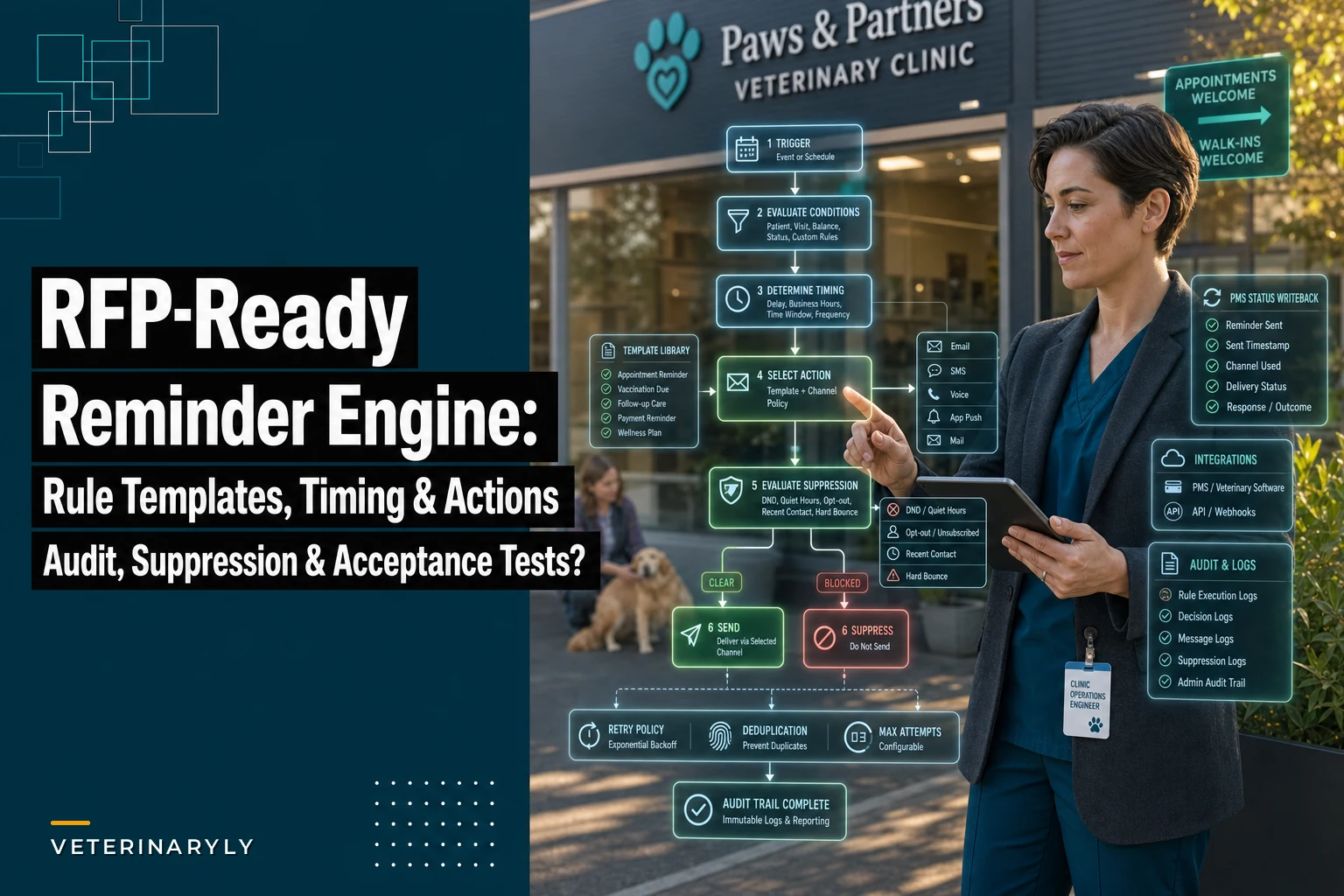
The difference between a flexible engine and a rigid one is whether rules are expressed as structured trigger → condition → timing → action objects, or hardcoded message types you can only toggle on and off. Ask the vendor to express the following rules in their system during the demo. If they can't, you've learned something important.
RULE: name: <human-readable> trigger: <event or schedule> conditions: [<list of filters that must all be true>] timing: <when relative to trigger> action: <message template + channel policy> suppression: [<conditions that cancel the send>]
Example Rule 1 — Standard appointment confirmation
trigger: appointment.created conditions: [appointment.status == "scheduled", appointment.type != "surgery"] timing: T-48h before appointment action: send(template="confirmstd", channels=[SMS, email]) suppression: [client.optedout == true, appointment.status in ("cancelled","confirmed")]
Example Rule 2 — Surgery with earlier, firmer confirmation
trigger: appointment.created conditions: [appointment.type == "surgery"] timing: T-72h, then T-24h if not confirmed action: send(template="confirm_surgery", channels=[SMS, voice]) suppression: [appointment.status != "scheduled"]
Example Rule 3 — Rabies recall tied to procedure code
trigger: schedule.daily conditions: [patient.lastproccode == "RAB-1Y", patient.alive == true, today >= lastvisitdate + 335d] timing: send once, re-evaluate at +30d if no booking action: send(template="recallrabies", channels=[email, SMS]) suppression: [patient.deceased == true, futureappointment.exists == true, client.recalloptout == true]
Example Rule 4 — Provider override
trigger: schedule.daily conditions: [patient.primaryprovider == "Dr. Okafor", patient.chronicflag == "renal"] timing: recall at +90d instead of clinic default +180d action: send(template="recallrenalrecheck", channels=[SMS]) suppression: [future_appointment.exists == true]
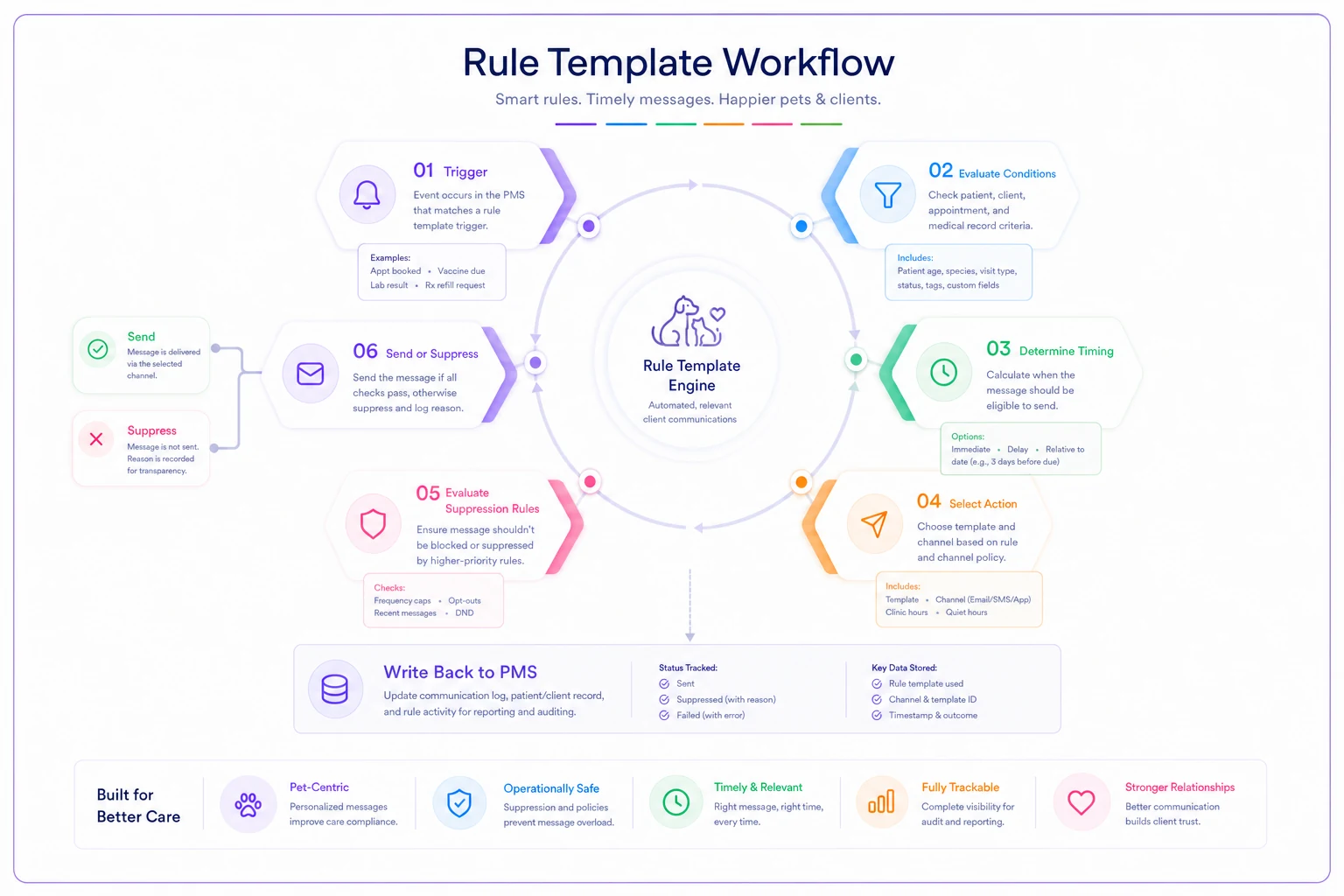
A good engine lets you write conditions against real PMS fields — procedure codes, provider, patient status. A weak one gives you a dropdown of five canned reminder types. The procedure-code and provider-override examples are the acid test. If recall timing can't vary by procedure or provider, every chronic-care patient gets the same generic cadence, and that's where recall revenue leaks.
Two-way reply mapping and PMS status transitions
Inbound replies are where most "reminder" products quietly fall apart. Sending is easy. Interpreting "yes, c, confirm, 1, 👍" and writing the correct status back into the PMS is the hard, valuable part.
Require an explicit mapping table. Here's a model your vendor should be able to populate and configure:
| Inbound reply (examples) | Interpreted intent | PMS status transition | Downstream action |
|---|---|---|---|
| C, YES, 1, CONFIRM, 👍 | Confirm | scheduled → confirmed | Suppress further confirmation reminders |
| R, RESCHEDULE, 2 | Reschedule request | scheduled → reschedule_pending | Create front-desk task; pause reminders |
| X, CANCEL, 3 | Cancel | scheduled → cancelled | Suppress all; open slot in schedule |
| STOP, UNSUBSCRIBE | Opt out | (no appt change) | Set client.opted_out = true, all channels |
| Free text ("my dog is sick") | Unknown | (no change) | Route to human queue, flag as unparsed |
Two things to insist on. First, unparsed messages must route to a human, not get silently dropped. The "my dog is sick" reply going into a black hole is a genuine patient-safety issue, not just an operational annoyance. Second, STOP must suppress across every channel and every message type, immediately — not "within 24 hours," not "for that campaign only."
Ask the vendor directly: when a client confirms by text, how fast does the confirmed status appear in the PMS, and does it suppress the already-queued T-24h reminder? If the answer is "it's eventual" or "the next sync," you'll keep double-messaging confirmed clients.
Recall cadence tied to visit metadata — with auto-suppression
Generic recalls are the single biggest source of embarrassing reminder failures. The fix is cadence logic that reads live visit metadata and suppresses itself automatically.
Specify these cadence inputs as requirements:
-
Procedure-code-driven intervals — rabies 1-year vs. 3-year, dental cleaning, wellness panel, each with its own interval.
-
Provider overrides — a vet who wants renal rechecks at 90 days instead of the clinic default.
-
Species/weight/age modifiers where clinically relevant (senior wellness at shorter intervals).
-
Hard auto-suppression rules, non-negotiable
- patient deceased → suppress everything, permanently - future appointment already booked for that service → suppress recall - client opted out of recalls specifically (distinct from opting out of confirmations) - active reschedule_pending status → pause, don't recall
The deceased-patient suppression deserves its own line in your contract. It is the failure clients remember and tell their friends about. A reminder engine that can't guarantee it won't text a grieving owner about their dead pet's vaccine is not fit for purpose, full stop.
Timezone, Do-Not-Disturb, and queued message behavior
This is the category that never shows up in a demo and always shows up in production.
-
Timezone source of truth. Is it the clinic's timezone, the client's, or the server's? For a single-site clinic this is simple; for anyone multi-site, server-timezone defaults cause messages to fire at 4 a.m.
-
Do-Not-Disturb windows. Configurable quiet hours (e.g., no sends 9 p.m.–8 a.m. local). Messages generated inside the window should queue, not drop.
-
Queue release behavior. When DND lifts at 8 a.m., does the queue release in a controlled trickle or dump 300 texts in one second and trip your SMS provider's rate limits?
-
Backlog handling after downtime. If the engine is down overnight, when it recovers does it send the entire backlog — including now-stale reminders for appointments that already passed? There must be a staleness cutoff. Don't send a T-48h reminder when the appointment is now in 6 hours.
A pattern that comes up repeatedly: an overnight outage, a recovery at 7 a.m., and a batch of reminders that should have been suppressed because they're no longer relevant. A proper engine evaluates each queued message against current conditions at send time, not at queue time.
Audit, logging, and retention schema
For anything client-facing you need a defensible record of what was sent, when, to whom, and why — plus consent state at the time. Ask for a logging schema that captures, per message event:
| Field | Purpose |
|---|---|
| message_id | Unique, idempotency + traceability |
| clientid / patientid | Who it concerned |
| rulename + ruleversion | Which rule fired and which version |
| channel | SMS / email / voice |
| status | queued / sent / delivered / failed / suppressed |
| failure_reason | Reason code if failed |
| suppression_reason | Why it was not sent (critical) |
| consentstateat_send | Opt-in status captured at the moment of send |
| timestamp (local + UTC) | Both, always |
Retention guidance: keep communication and consent logs for a period consistent with your records-retention policy — commonly aligned with medical record retention in your jurisdiction. Suppression and opt-out events deserve longer retention than routine sends, because they're your defense if someone claims they were contacted after opting out.
The suppressionreason field is the one vendors skip and the one you'll care about most during a dispute. "We didn't text you" is a weak defense. "We suppressed on 2024-03-12, reason=clientopt_out, logged" is a strong one.
Consent capture and suppression exposure
You need a clean, queryable record of consent per channel. A minimal consent schema to specify:
consentrecord: clientid channel: [SMS | email | voice] consenttype: [appointment | recall | marketing] status: [optedin | optedout] capturedat capturedvia: [intakeform | replySTOP | frontdesk | portal] source_reference (form ID, message ID, staff user)
Note the separation of consent_type. A client can want appointment confirmations but not marketing recalls. Lumping them together means one "STOP" kills your legitimate confirmation reminders too — which then drives up no-shows. Require granular, per-type consent.
Suppression exposure means staff can, at a glance, see why a given client isn't getting messages. Front desk should be able to pull up a client and see "opted out of recall SMS on this date" without filing a support ticket. If suppression state is invisible to staff, they'll make promises to clients the system then silently breaks.
KPIs and dashboards to require
You can't manage what the engine won't report. Specify these as standard, exportable metrics — not custom report requests:
-
Delivery rate by channel (sent vs. delivered)
-
Confirmation rate (% of reminders that produced a confirm reply)
-
No-show rate segmented by confirmed vs. unconfirmed vs. unreached
-
Recall conversion — recalls sent → appointments booked within a window
-
Suppression volume and reasons (watch for a spike in opt-outs after a message change)
-
Failed-send rate with reason breakdown
-
Time-to-status-write (how long between client reply and PMS update)
A quiet but useful metric: no-show rate split by whether the client was actually reached on any channel. If "unreached" clients no-show at three or four times the rate of confirmed ones, that's your fallback sequencing either earning its keep — or exposing that it isn't working.
Sandbox, throughput, and acceptance testing
Never accept a reminder engine on the strength of a happy-path demo. Put these in the contract as acceptance criteria, tested in a sandbox with your data shape.
-
A sandbox environment separate from production, safe to send test traffic
-
Stated send throughput (messages/minute) and behavior at the rate ceiling
-
Ability to simulate inbound replies to test reply mapping end-to-end
-
Behavior under a simulated channel outage (does fallback actually fire?)
Acceptance test scenarios — require a documented pass on each:
-
Confirmation happy path — appointment created, reminder fires at T-48h, client replies "C", PMS flips to
confirmed, T-24h reminder is suppressed. Webhook check: confirm the inbound-reply webhook posts within a defined SLA and the status-write API call succeeds. -
Channel fallback — invalid SMS number, hard failure logged, email fallback sends, failure_reason recorded. API check: GET the message event, verify
status=failed, channel=SMSfollowed bystatus=sent, channel=email. -
Deceased suppression — mark a test patient deceased, run the daily recall job, verify zero sends and a logged
suppressionreason=patientdeceased. -
Opt-out propagation — send "STOP" on SMS, verify
opted_outacross all message types within the SLA, verify a queued message is pulled before send. -
DND queueing — generate a message inside quiet hours, verify it queues and releases after the window, not dropped, not fired at 3 a.m.
-
Backlog staleness — pause the engine, let an appointment pass, resume, verify the stale reminder is suppressed rather than sent.
-
Deduplication — create two appointments for one client same day, verify the dedupe policy you specified actually collapses them.
For each, require a sample webhook payload and the exact API response the vendor expects. If they can't produce example payloads, their integration surface isn't as mature as the sales deck suggests.
User roles and localization
Two often-skipped sections that cause real friction after go-live.
Role-based controls to specify:
-
Who can create or edit rules (likely practice manager only — rule edits change client-facing behavior)
-
Who can view logs and suppression state (front desk
read-only)
-
Who can manually override suppression (narrow, logged, and reversible)
-
Separation between editing message templates and editing rule logic — different risk levels
Localization considerations:
-
Message templates in the client's preferred language, selected per client
-
Correct date/time formatting per locale (nobody should decode MM/DD vs DD/MM at a vet clinic)
-
Timezone handling as covered above — this is localization too
-
Character-set and segment handling for SMS so a long translated message doesn't silently truncate
Role control matters more than it looks. A reminder engine where any staff member can edit the rule controlling recall timing is one bad afternoon away from suppressing all your rabies recalls by accident. Lock rule editing, log every change with the rule_version field, and you can always answer "who changed what, when."
A short real-world scenario
A two-vet suburban clinic — roughly 330–360 appointments a month — ran reminders off a basic SMS-only tool. No fallback, no deduplication, recalls driven by a static spreadsheet exported quarterly.
The symptoms were ordinary and expensive. No-show rate hovered around 11–12%. Several times a quarter, a recall went to a deceased patient and a staff member spent twenty minutes on damage control and apologies. Multi-pet households got two or three overlapping reminder threads, which generated confused phone calls that ate the front desk's morning.
The fixes were almost entirely configuration, not new technology: add email fallback behind SMS, collapse household reminders into one thread, tie recalls to live patient status with a hard deceased-suppression rule, and map inbound confirmations straight into the PMS status. Within a couple of months no-shows settled into the 7–8% range, the deceased-patient incidents stopped, and the confused "why did I get three texts" calls largely disappeared. Nothing dramatic — just the engine finally knowing when not to send.
That's the lesson that should shape your RFP. The value of a reminder engine isn't in how well it sends. It's in how reliably it decides, suppresses, falls back, and writes status back where staff can see it. Score vendors on the edges, test the suppression logic in a sandbox before you sign, and put the acceptance scenarios above directly into the contract. The demo will always look fine. The edges are where your money is.
Ready to elevate your clinic’s efficiency?
Join 500+ veterinary clinics using Veterinaryly to save time, reduce administrative overhead, and improve patient care.