


Most clinics don't switch practice management software because they love shopping for it. They switch because something broke — invoices stopped reconciling, the old system got sold to a conglomerate that jacked support fees, or the reminder module quietly stopped firing and nobody noticed until recheck volume dropped. By the time a practice is actively looking, there's usually already a wound.
That's the wrong time to be learning how to evaluate vendors. The decision follows you for five to seven years, touches every appointment, and lives inside every medical record. So this guide works through it the way a careful buyer actually should: what to prioritize, who to look at by clinic size, the exact questions to ask (including the awkward AI ones vendors hope you skip), what it costs, and how to run the migration without losing a week of revenue.
Start with the part everyone gets backwards.
Most feature lists are useless. Here's how to weight them.
Vendors publish feature grids with 140 checkboxes, and every box is checked. It tells you nothing. A reminder module that technically exists but can't send a two-week post-surgical recheck on a custom cadence is worthless to you even though it earns a green checkmark.
The trick is separating features into three buckets: deal-breakers, daily-friction features, and nice-to-haves you'll never configure. Practices tend to obsess over the flashy stuff — telemedicine, dashboards — and under-test the boring daily-friction features that actually determine whether staff hate their jobs: invoice editing, appointment drag-and-drop, how many clicks it takes to add a vaccine to a visit.
Here's a prioritized checklist weighted by how much pain each area causes when it's bad:
Tier 1 — Deal-breakers (if these are weak, walk away):
-
Medical records / EMR — SOAP templates, species-specific fields, problem lists, the ability to amend notes with an audit trail, and clean handoff between doctors. Test whether a tech-entered note and a doctor-entered note merge cleanly on one visit.
-
Invoicing tied to the medical record — every charge should originate from something documented. If you can invoice a procedure that isn't in the record (or document a procedure that never hits the invoice), you have a revenue-leak machine.
-
Appointment scheduling — multi-doctor views, resource/room booking, color-coded appointment types, and visible double-booking warnings. Drag-and-drop reschedule is not a luxury; your front desk does it dozens of times a day.
-
Data ownership and export — can you get a full, structured export of your own data, including images and attachments, without paying a ransom? More on this later, because it's the single most ignored item in the entire process.
Tier 2 — Daily-friction features (weak versions cost you hours every day):
-
Reminders, confirmations, and configurable recall cadences
-
Inventory with controlled-substance tracking and reorder points
-
Integrated payments and end-of-day reconciliation
-
Lab and imaging integration (results landing in the right chart automatically)
-
Boarding/grooming modules if those are service lines
-
Client-facing portal and online booking
Tier 3 — Evaluate but don't over-weight:
-
Telemedicine/video (many clinics use a separate tool anyway)
-
Built-in marketing/email campaigns
-
Loyalty and wellness-plan management
-
Advanced custom reporting (great if it exists, but verify it's actually usable by a non-technical manager)
One pattern worth naming: clinics frequently buy for the features they demo and suffer from the features they use. Demos showcase Tier 3. Your staff live in Tier 1 and Tier 2. Weight your scoring accordingly — Tier 1 at roughly 50% of your total evaluation score, Tier 2 at 35%, Tier 3 at 15%.
A vendor shortlist by clinic size
There's no universally "best" system. A platform that's perfect for a 12-doctor specialty hospital will bury a solo mobile vet in configuration they'll never use. Match the tool to your operational weight.
Never miss a pet’s appointment again.
Veterinaryly helps you schedule, confirm, and manage every appointment and patient record effortlessly.
- Centralized appointment & patient management
- Automated client reminders
- Staff scheduling & task tracking
No credit card required
| Clinic profile | What usually fits | What to watch for |
|---|---|---|
| Solo / mobile / 1–2 DVM | Lightweight cloud systems with fast setup, flat pricing, minimal IT | Thin inventory and reporting; may outgrow it in 2–3 years |
| Small clinic (2–5 DVM) | Mainstream cloud PIMS with full invoicing, reminders, inventory | Per-user pricing adds up; confirm reporting is usable without a consultant |
| Mid-size / multi-doctor (5–12 DVM) | Established cloud or hybrid platforms with strong integrations and roles/permissions | Migration complexity; integration fees; support responsiveness under load |
| Specialty / referral / ER | Platforms with deep EMR customization, referral workflows, DICOM handling | Over-engineering; long implementations; heavy training burden |
| Multi-site groups | Enterprise platforms with centralized reporting and cross-site records | Standardization vs. per-site autonomy; data governance across locations |
Deliberately not naming brands here, because vendor quality shifts year to year — acquisitions change support quality, pricing, and roadmaps fast. A system that was the clear favorite three years ago may be mid-migration to a new backend today. Build the shortlist from the profile column, then pressure-test the actual vendors with the RFP below.
The RFP questions that actually separate vendors
Generic RFPs get generic answers. The questions that produce signal are the specific, slightly uncomfortable ones — the ones a weak vendor has to dodge. Group them like this.
Data ownership and exit:
-
If we leave, exactly what do we get back, in what format, and at what cost? Ask for a sample export file.
-
Do you charge for data migration out, or only in?
-
Who owns the data — in writing, which clause and which page?
EMR and clinical integrity:
-
Show me how an amended note displays the original version and the change history.
-
How are multi-doctor and tech-entered entries attributed on a single visit?
-
Can we build species- and procedure-specific templates ourselves, or does that require a paid service request each time?
Invoicing and revenue capture:
-
Can a procedure be documented without generating a charge? Show the missed-charge report.
-
How does the system handle estimate → invoice conversion and partial payments?
Integrations:
-
Which labs, imaging/PACS, payment processors, and lab analyzers do you integrate with natively vs. via third-party middleware — and who pays for the middleware?
-
What's the real-world latency on lab results landing in the chart?
AI-enabled features (ask every one of these):
-
Which features use generative or predictive AI, specifically — scribing, note drafting, reminder targeting, diagnostic suggestions, coding?
-
What data was each model trained on, and is our clinic data used to train models that benefit other customers?
-
How do you validate accuracy, and can you show the error rates and the validation methodology?
-
Can every AI-generated note or suggestion be reviewed and edited by a clinician before it's committed to the record, with the AI origin flagged in the audit trail?
-
What's your process when the AI produces a clinically wrong output — who's liable, and how is it logged?
Those last five matter more every quarter. Vendors are racing to bolt "AI scribe" and "AI insights" onto their platforms, and the validation story is often thinner than the marketing. Before you accept any AI-generated clinical content into your records, work through a proper audit and validation process — the clinic-focused walkthrough in the FDA generative-AI playbook for veterinary practices lays out exactly what to demand and how to test it. Treat that as mandatory homework before signing anything that puts AI near your medical record.
A well-implemented AI-assisted system can meaningfully reduce documentation time and catch missed charges — but only if a clinician stays in the loop and the audit trail is clean. A bad one quietly writes plausible-sounding notes nobody verified. The difference is entirely in the validation and the review workflow, not in the demo.
What it actually costs
Pricing in this category is deliberately murky. Published numbers rarely match the invoice you'll sign, because the real cost is bundled across the license, add-ons, payment processing margin, and setup.
Rough ranges, with the caveat that these move around:
-
Cloud per-user/month commonly $100–$350 per user per month, sometimes more for specialty.
-
Flat-rate cloud (smaller systems) roughly $200–$600/month total for small clinics.
-
Legacy server/on-prem larger upfront license plus annual support; declining but not dead.
-
One-time setup/migration anywhere from a few hundred dollars to $3k–$10k+ depending on data volume and history.
-
Payment processing this is where margin hides. A 0.3% difference on $1.5M in annual card volume is roughly $4,500/year — ask for the exact rate, not "competitive rates."
The number that catches clinics off guard is the per-user model at scale. A seven-person team at $200/user is $1,400/month — around $16k–$17k a year — before payment processing and add-ons. That's fine if the system earns it back in reduced missed charges and fewer no-shows. It's a problem if half those users barely touch the software. Count your actual concurrent users, not your headcount.
Ask every finalist for a three-year total cost of ownership including license, setup, processing, integrations, and projected user growth. A cheaper monthly rate with a punishing processing margin can easily be the more expensive choice over the contract term.
When a new system makes sense — and when it doesn't
When switching is justified:
-
Your current vendor's support has become unusable or pricing jumped after an acquisition.
-
You can't get clean reports, so missed charges and recall gaps are invisible.
-
You're adding locations and need centralized records.
-
The system blocks a service line you want to launch.
When switching is usually a mistake:
-
The real problem is workflow, not software. If charges leak because nobody follows the invoicing SOP, a new system just leaks them differently.
-
You're mid-crisis — short-staffed, peak season. A migration during chaos multiplies the chaos.
-
You're switching to save $150/month. The migration cost and productivity dip will swamp the savings for a year or more.
Who should not migrate right now: a clinic with no data owner — nobody responsible for record quality, charge capture, and reporting. If no one owns the data today, a new platform just gives you cleaner-looking chaos. Fix ownership first, then migrate.
The migration timeline and checklist
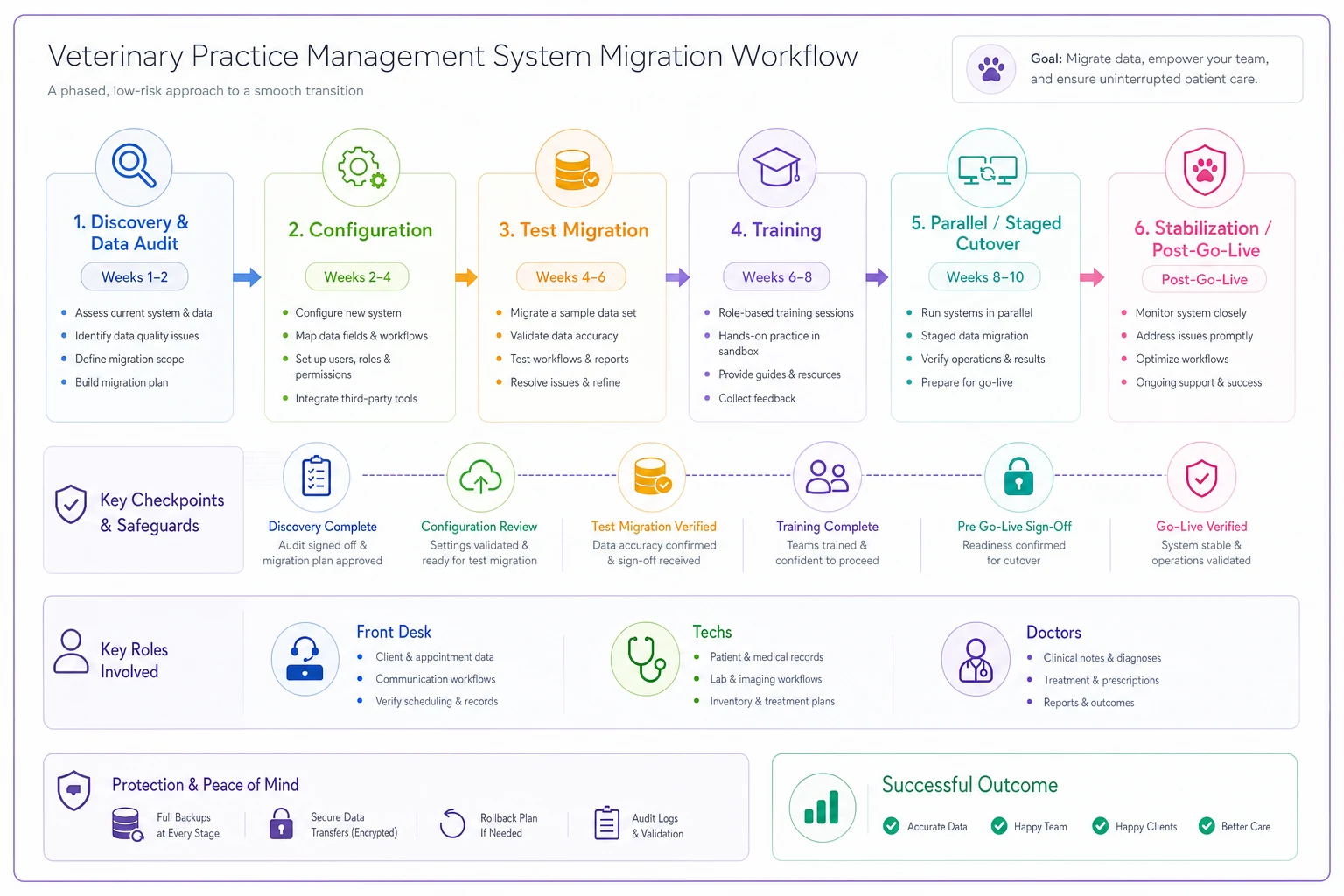
This is where good buying decisions go to die. A sound platform, chosen through a sound process, still fails if the cutover is sloppy. Plan for 8 to 12 weeks from signed contract to go-live for a typical small-to-mid clinic; longer for specialty or multi-site.
A realistic sequence:
-
Weeks 1–2 — Discovery and data audit. Pull a full export of your current data. Audit it for duplicate clients, dead patients, broken reminders, and garbage inventory records. Clean before you migrate — never move junk into a new home.
-
Weeks 2–4 — Configuration. Build appointment types, templates, item/price lists, tax rules, user roles, and reminder cadences. This is the slow part, and the part clinics underestimate most.
-
Weeks 4–6 — Test migration. Move a copy of the data into a sandbox. Verify record counts, spot-check 25–50 patient histories, confirm balances reconcile, confirm images and attachments carried over.
-
Weeks 6–8 — Training. Role-based, not one giant session. Front desk, techs, and doctors use the system differently and need different training. Record the sessions.
-
Weeks 8–10 — Parallel or staged cutover. Many clinics run a short parallel period or go live on a slow day. Keep the old system available read-only for at least 90 days.
-
Post-go-live — Stabilization. Expect a 10–20% productivity dip for the first two weeks. Staff it. Don't schedule a full book during week one.
Here's a simple workflow view of that migration.
Pre-go-live checklist (non-negotiables):
-
[ ] Full data export secured and backed up independently
-
[ ] Record counts verified old vs. new
-
[ ] Open invoices and account balances reconcile
-
[ ] Controlled-substance logs transferred and verified
-
[ ] Lab/imaging/payment integrations tested with live test transactions
-
[ ] Reminder cadences firing correctly in the sandbox
-
[ ] Roles and permissions set so staff can't see or do more than they should
-
[ ] Old system retained read-only for 90+ days
-
[ ] A named person owns the cutover day go/no-go decision
Migrating without this checklist complete isn't bold — it's just expensive.
Data security and compliance you can't skip
Veterinary records aren't covered by HIPAA the way human health records are, which lulls clinics into treating security casually. That's a mistake — you're still holding client financial data, payment info, and personal details that make you a target. Controlled-substance records carry their own legal weight regardless.
Minimum bar for any vendor:
-
Encryption in transit and at rest.
-
Role-based access with individual logins — no shared "front desk" password. You need to know who did what.
-
Audit trails on record changes, especially note amendments and controlled-substance movements.
-
Backup and recovery — ask their RPO/RTO, and whether you can trigger a restore or you're at the vendor's mercy.
-
Breach notification terms in the contract.
-
A signed data-ownership clause. Worth repeating
you own your data, in writing.
For AI features specifically, add one more: confirmation of whether your data trains their models and whether any patient or client data leaves their environment to a third-party model provider. If the answer is vague, treat it as a yes and decide if you're comfortable with that.
Integrations matrix — what to verify before signing
Integrations are where "yes we support that" quietly becomes "yes, through a paid third-party connector with a monthly fee and a two-second lag." Build a matrix and make the vendor fill it in column by column.
| Integration | Native? | Via middleware? | Extra cost? | Latency / reliability notes |
|---|---|---|---|---|
| Reference labs (your specific labs) | ||||
| In-house analyzers | ||||
| Imaging / PACS / DICOM | ||||
| Payment processor | ||||
| Online booking / portal | ||||
| Pharmacy / home delivery | ||||
| Accounting export | ||||
| Reminder/communication channels |
The line clinics most often forget: accounting export. If your bookkeeper can't pull clean financial data out monthly, you'll be reconciling by hand indefinitely. Confirm the format before you sign.
A short real scenario
A four-doctor companion-animal clinic was running an aging server-based system with support that had slowed to a crawl after the vendor got acquired. Their monthly missed-charge rate was invisible because the system couldn't produce the report, and reminders had degraded to the point that recheck volume was quietly softening.
They ran a structured evaluation: weighted Tier 1 features heavily, shortlisted three cloud platforms based on their size profile, and put all three through the full RFP — including the data-exit and AI-validation questions. One finalist couldn't produce a clean sample export and effectively dropped out of contention on that fact alone.
Migration took about ten weeks. They cleaned roughly 600 duplicate and dead client records before moving anything. After go-live, the missed-charge report — which they'd never had access to before — surfaced somewhere around $1,800–$2,600 a month in documented-but-unbilled line items, mostly small stuff: nail trims, extra vaccines, consumables. Fixing that alone covered the new system's cost several times over. Reminders, properly configured, pulled recheck bookings back up over the following two months. Nothing dramatic in any single week — just a steady recovery once they could finally see where the leaks were.
The lesson wasn't that the new software was magic. It was that a disciplined evaluation surfaced a vendor flaw early, and a clean migration surfaced a revenue problem they'd been bleeding for years without a report to show it.
Next steps
Don't start with demos. Start with your own data and your own pain. Pull a current export, find out whether you even can, and audit how bad the record quality actually is. Write down your Tier 1 deal-breakers before you talk to a single salesperson, because the demo is designed to pull your attention toward Tier 3.
Then build the shortlist from the size profile, run the RFP with every uncomfortable question intact, insist on a three-year total-cost number, and — if any system is putting AI anywhere near your medical records — work through the FDA generative-AI validation playbook for clinics before you sign, so you're buying validated features instead of marketing language.
The clinics that make this decision well aren't the ones who found the perfect platform. They're the ones who knew exactly what they needed, tested for the boring stuff their staff use every day, protected their data on the way in and the way out, and ran the migration like the operational project it actually is. Get those four things right and almost any solid platform will serve you well. Get them wrong and even the best software becomes another thing to replace in three years.
The clinics that make this decision well aren't the ones who found the perfect platform. They're the ones who knew exactly what they needed, tested for the boring stuff their staff use every day, protected their data on the way in and the way out, and ran the migration like the operational project it actually is. Get those four things right and almost any solid platform will serve you well. Get them wrong and even the best software becomes another thing to replace in three years.
Ready to elevate your clinic’s efficiency?
Join 500+ veterinary clinics using Veterinaryly to save time, reduce administrative overhead, and improve patient care.