


Most clinics don't lose money on on-call because they pay too much. They lose it because their pay model doesn't match how the call actually behaves. A quiet standby night gets paid like an active one, or a brutal night where the doctor got called in three times gets paid a flat stipend that doesn't come close to covering it. Either way, someone's getting the short end — and over a few months that friction turns into resentment, sloppy documentation, and eventually a resignation letter.
The core decision underneath all of this is deceptively simple: are you paying someone to be available, or paying them for work performed? Those are two different things, and mixing them up is where most veterinary on-call scheduling pay model problems start.
This piece stays narrow on purpose. We're going to work through standby vs call-in pay structures, how escalation cascades interact with what you owe people, what you actually need to document to protect the clinic, and how payroll triggers should fire — with worked numbers, not theory.
Standby vs Call-In: the two pay ladders, and why clinics blur them
Standby pay compensates someone for being reachable and restricted. They can't have three drinks, can't drive two hours away, need to answer within a set window. Call-in pay compensates them for actually coming in or doing real clinical work — a phone triage that turns into orders, a callback that runs 40 minutes, a drive-in for a GDV at 2 a.m.
The mistake clinics make constantly: paying a single flat "on-call rate" and pretending it covers both. That works fine on light nights and quietly falls apart on heavy ones. The doctor who handled one 90-second callback and the doctor who did an emergency splenectomy at 3 a.m. both got the same $150. One of them is furious, and you won't hear about it until they've already interviewed somewhere else.
| Component | What it pays for | Typical structure | When it triggers |
|---|---|---|---|
| Standby / availability | Being reachable and restricted | Flat rate per shift or hourly | Automatically, whole on-call window |
| Call-in (remote) | Phone work, orders, real decision-making | Per-incident or minimum block | When a call exceeds a defined threshold |
| Call-in (physical) | Coming into the building | Minimum guaranteed hours + hourly | The moment they're asked to drive in |
| Escalation bump | Being the second or third person pulled in | Premium % on top of base | When the cascade moves past tier 1 |
The point isn't to copy this table exactly. It's to stop paying one number for four different realities.
A worked example on the standby side
Say your standby rate is $4/hour for a 12-hour overnight window. That's $48 just to be reachable, whether or not the phone rings. On a quiet Tuesday, the doctor makes $48 and sleeps. Fair enough — you're renting their availability and their restricted evening.
Now layer call-in on top. Define a threshold: any remote call under 10 minutes is covered by standby, anything over 10 minutes triggers a 1-hour minimum call-in block at, say, $65/hour. A physical drive-in triggers a 3-hour minimum at the same rate plus mileage.
So a night with two quick callbacks: $48. A night with one 25-minute phone consult that turns into a treatment plan: $48 + $65 = $113. A night with a drive-in emergency: $48 + $195 = $243. Same person, three very different nights, three very different checks. That's the whole idea — the pay tracks the burden.
The cascade logic itself — who's next, how long you wait before rolling to the next tier, what counts as "no answer" — deserves its own written policy. We went deep on the mechanics of that in the shift-swap, on-call, and overtime policy template for clinics, including the approval matrix and how the emergency cascade should read. Pay is the layer that sits on top of that cascade — it assumes the cascade structure is already sorted.
Escalation cascades and why they change the math
An escalation cascade is your ordered list of who gets called when the first person doesn't answer. Most clinics have one written down somewhere. Very few have connected it to pay, and that gap creates two problems.
Never miss a pet’s appointment again.
Veterinaryly helps you schedule, confirm, and manage every appointment and patient record effortlessly.
- Centralized appointment & patient management
- Automated client reminders
- Staff scheduling & task tracking
No credit card required
First, the person sitting at tier 2 or tier 3 is also restricted, even if they never get called. If your DVM is primary but your senior tech is backup, that tech's evening is constrained too. Pay only the primary and you're getting free availability from the backup — which works right up until they stop picking up at 1 a.m. because they're not getting anything for it.
Second, when the cascade actually fires, whoever answers deep in the chain often did more coordination, not less. They're the third call, they're groggy, they're catching a case cold. Paying them the same flat rate as tier 1 ignores all of that.
A workable pattern:
-
Tier 1 (primary) full standby rate + call-in ladder
-
Tier 2 (backup) reduced standby rate (say half) + full call-in rate if activated
-
Tier 3 (last resort, often the owner or a senior DVM) small flat retainer + call-in premium if pulled in
The failure mode nobody plans for
A typical breakdown looks like this: primary DVM doesn't hear the phone. System rolls to backup after 5 minutes. Backup handles the case, drives in, spends four hours. But payroll only has a rule for "the on-call doctor," and the on-call doctor that night was technically the primary who slept through it. Now your manager is improvising a pay decision at the end of a pay period, the backup feels cheated, and there's no documented basis for whatever gets paid.
The fix is to attach pay rules to cascade position at time of activation, not to a name on the calendar. Whoever the system actually reached and activated is the one the pay rules apply to. Simple in concept — but it only works if you're actually logging who got activated and when.
Documentation: the part that protects you when something goes wrong
On-call is where liability and payroll disputes overlap, and both come down to records. If a case goes sideways at 3 a.m. and there's a complaint later, you want a clean timeline. If a payroll dispute lands on your desk, you want the same timeline. One set of records serves both.
At minimum, you want captured for every on-call activation:
-
Timestamp the call came in
-
Who was contacted, at what cascade tier
-
Whether they answered, and response time
-
What the interaction was — phone triage, remote orders, drive-in
-
Duration, especially against your call-in threshold
-
Clinical decisions or advice given (this is the liability piece)
-
Which pay category the event falls into
-
Any handoff to day staff the next morning
That last one matters more than people expect. A large share of after-hours risk isn't the overnight care itself — it's the gap where nobody told the morning team what happened. Whatever gets decided at 3 a.m. needs to land in front of the day crew before the 8 a.m. rush swallows it.
For the phone-triage portion specifically, the quality of documentation depends on whether your team is following consistent decision thresholds. If after-hours phone advice is improvised, both your clinical exposure and your documentation get shakier. Structured scripts help — we covered how structured teletriage scripts and thresholds let clinics safely triage remote cases, and the same discipline that keeps triage safe also produces the records you'll want if a call is ever questioned.
Why documentation quietly fails at 3 a.m.
The realistic problem: a tired person at 3 a.m. is not going to fill out a form. If your documentation requirement is heavy, it won't happen, and you'll have gaps exactly on the nights you most need records. The trick is to make capture nearly automatic — a short structured note, ideally logged as part of the same system that already knows who was on call and who got activated. If logging is a separate five-minute chore, it gets skipped. If it's two taps at the end of a call, it gets done.
Make logging part of the call flow — a two-tap structured note at the end of any triage call increases compliance.
Documentation also needs to be consistent enough that the same event logged by two different people looks roughly the same. If one DVM writes three sentences and another writes nothing, you don't have a record system — you have a collection of habits. Standardizing the format, even loosely, is what makes the log actually usable when you need it.
SLA-driven escalation matrices tied to payroll triggers
An SLA here just means: how fast does someone have to respond, and what happens if they don't. Tie that to the cascade and to pay, and you get a matrix that runs itself instead of relying on someone's memory at payroll time.
A simple version:
-
Call comes in. Timer starts.
-
Tier 1 has 5 minutes to acknowledge. If acknowledged, standby-to-call-in rules apply based on what happens next.
-
No acknowledgment at 5 minutes → auto-escalate to Tier 2. Tier 2's SLA clock starts; Tier 1's standby pay for that shift may be reduced per policy (this is a decision you make in advance, not in the moment).
-
Tier 2 acknowledges → their call-in ladder applies. Duration and drive-in status determine the pay block.
-
No acknowledgment at Tier 2 within the window → escalate to Tier 3. Owner or senior DVM. Their retainer-plus-premium structure kicks in.
-
Event closes. Duration, category, and cascade position get stamped. These feed the payroll trigger directly.
The payroll trigger is the piece most clinics handle by hand and get wrong. A trigger is just a rule: if the logged event has these attributes, it maps to this pay code and this amount. If your log records "Tier 2, drive-in, 4 hours," the trigger already knows that's a 3-hour minimum at the call-in rate, actual hours since it ran long, plus mileage, plus the backup activation. Nobody reconstructs it from memory two weeks later.
This is where clinics running scheduling on paper or a shared spreadsheet feel the most pain. The information needed to pay people correctly is scattered across text messages, a whiteboard, and someone's recollection. Pulling it together every pay period is manual, error-prone, and slow. When the schedule, the cascade, the activation log, and the pay codes live in one operational system, the payroll trigger can fire off the recorded event automatically — and disputes drop because everyone can see the same timeline. That's not about fancy technology; it's about not keeping four versions of the truth in four different places.
The diagram below shows the escalation workflow and how payroll triggers map events to pay codes.
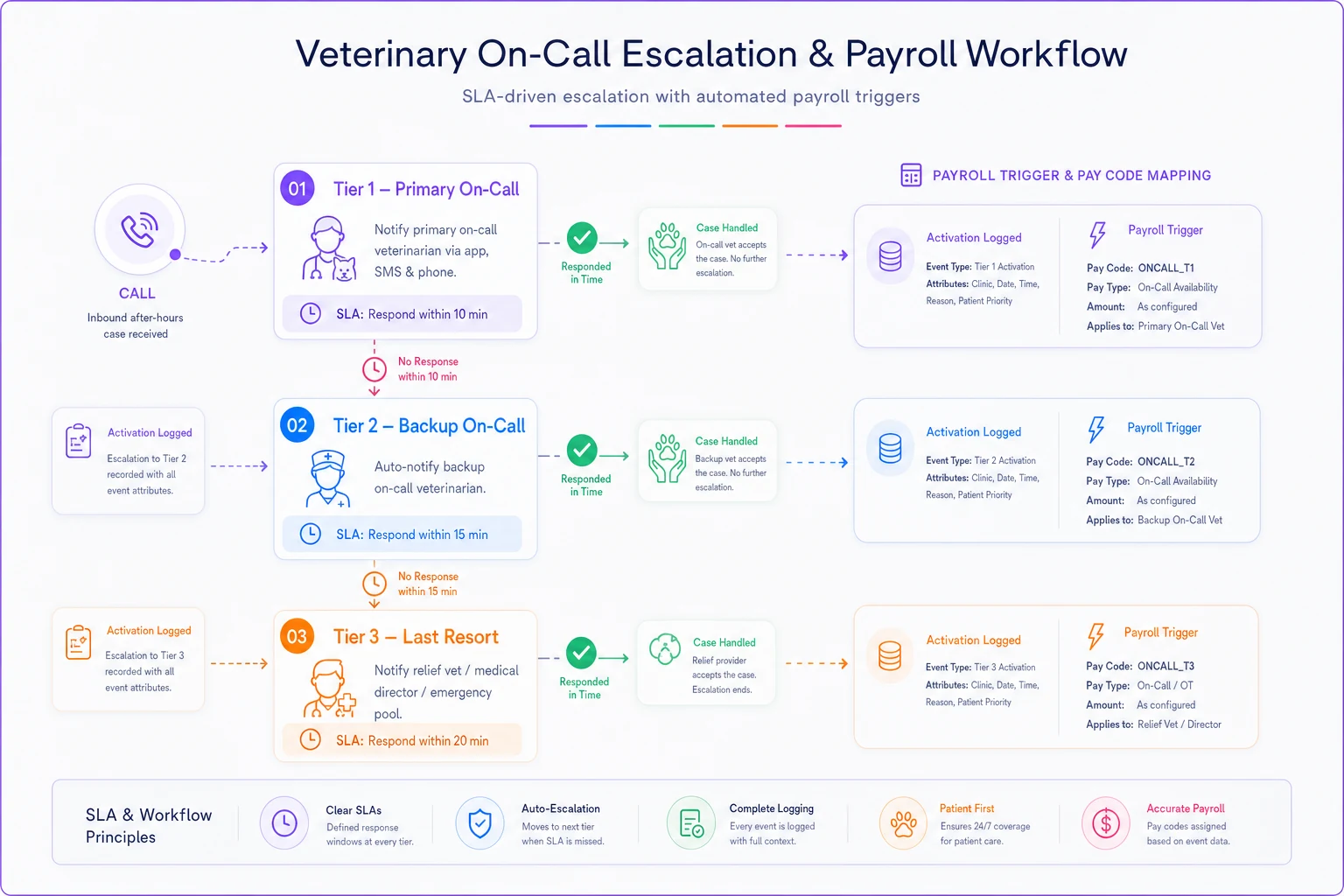
This maps each escalation step to the payroll trigger so it's clear who gets paid what when.
A real scenario, with the numbers
A three-DVM small-animal clinic ran a flat $175 on-call stipend per overnight — one number covering everything. On paper, cheap and simple. In practice, their busiest doctor was pulling multiple heavy nights a month — drive-ins, long phone consults — and getting the exact same $175 as a colleague who slept through her rotations.
The visible cost was turnover risk. The busy DVM was openly frustrated, and the practice manager knew a resignation was coming. The hidden cost was the backup tier: the senior tech who covered escalations wasn't paid at all for being restricted, and had quietly started letting calls go to voicemail.
They split the ladder. Standby dropped to roughly $50 per overnight window for the primary, but call-in got real: a 1-hour minimum for remote work over 10 minutes at about $60/hour, and a 3-hour minimum for drive-ins. The backup tech got a reduced standby rate plus full call-in if activated.
Month-to-month payroll cost barely moved — quiet nights got cheaper, heavy nights got more expensive, and it roughly washed out. But the distribution changed completely. The busy DVM's frustration eased because heavy nights finally paid like heavy nights. The backup tech started answering reliably again because being on the hook now meant something. The clinic didn't spend meaningfully more on on-call. It just spent it in the right places.
When splitting the ladder makes sense — and when it doesn't
This makes sense when:
-
Your on-call load is uneven — some nights brutal, some dead quiet
-
You have a real cascade with backup tiers, not just one person
-
Payroll disputes or "that's not fair" conversations keep coming up
-
You've had a near-miss on documentation for an after-hours case
This is probably overkill when:
-
You're a solo or two-person practice where the same person always covers and everyone already understands the deal
-
Your after-hours volume is genuinely tiny and predictable
-
A flat rate that everyone agrees is generous is keeping the peace
Who should not do this without cleaning up first: clinics with no reliable way to log who got called and when. If you can't capture the activation, you can't run threshold-based pay honestly — you'll just be arguing over estimates, which is the exact problem you started with. Get the logging solid first, then layer the pay ladder on top.
None of this requires a dramatic operational overhaul. Most clinics are already 80% of the way there — they have a cascade, they have a rough pay number, they have some documentation habit. The gap is usually just connecting those three things so they talk to each other.
Closing thought
The pay model you choose for on-call is really a statement about how you value your people's nights. A flat rate says every night is the same, which everyone knows isn't true. A layered model — standby for availability, call-in for work, cascade-aware pay, all tied to a documented activation log — says you actually see the difference between a quiet Tuesday and a 3 a.m. splenectomy. Get the documentation and the payroll triggers running off the same record, and you fix the fairness problem and the liability problem in one move.
Pay the burden you actually asked someone to carry, and keep the receipts.
Ready to elevate your clinic’s efficiency?
Join 500+ veterinary clinics using Veterinaryly to save time, reduce administrative overhead, and improve patient care.