


Most veterinary clinics run their staff scheduling backwards. They look at next week's appointments, guess who they need, then scramble when reality hits differently. The result? Overstaffing on slow days, understaffing during rushes, and labor costs that swing wildly between 35% and 55% of revenue depending on the month.
The problem isn't that clinic managers can't schedule. It's that they're using the wrong system entirely. They're trying to match staff to appointments when they should be matching staff to operational capacity patterns.
I've watched this pattern repeat across different markets—reactive scheduling creates a cascade of operational problems that compound over time. A clinic in Denver might handle 400 appointments weekly with 12 staff members and maintain 42% labor costs. Another clinic down the street sees the same volume but needs 16 people and runs at 54% labor costs. The difference? One schedules based on capacity patterns, the other reacts to whatever happened yesterday.
Why Traditional Schedule Building Breaks Down
Traditional veterinary staff scheduling usually works like this: the practice manager looks at next week's appointments, counts surgery slots, estimates walk-ins, then builds a schedule. When Monday arrives and three techs call out sick, they start texting the group chat. By Wednesday, they're approving overtime. By Friday, they're already adjusting next week's schedule based on this week's chaos.
This approach fails because it assumes appointments equal workload. But workload in a veterinary clinic comes from multiple sources that don't show up in appointment counts. Emergency cases that need immediate attention. Phone calls about test results. Prescription refills. Follow-up communications. Lab processing. Inventory management. Training new staff. Equipment maintenance.
A fully booked surgery day with six procedures might actually require less staffing than a half-booked wellness day with constant walk-ins and phone calls. The surgery day has predictable workflows and clear handoffs. The wellness day creates unpredictable surges and constant task-switching.
What really drives costs up is the mismatch between actual capacity needs and reactive scheduling decisions. When you staff based on yesterday's problems, you're always behind the operational curve.
Demand Patterns Most Clinics Ignore
Real demand in veterinary clinics follows predictable patterns that appointment counts don't capture. Monday mornings surge with weekend emergency follow-ups. Wednesday afternoons slow down except during summer when boarding pickups spike. Friday evenings see increased urgent care visits. Saturday mornings bring the working pet owners who can't make weekday appointments.
Never miss a pet’s appointment again.
Veterinaryly helps you schedule, confirm, and manage every appointment and patient record effortlessly.
- Centralized appointment & patient management
- Automated client reminders
- Staff scheduling & task tracking
No credit card required
These patterns exist in your clinic data, but they're hidden across different systems. Appointment volumes sit in your practice management software. Phone call volumes live in your phone system reports. Walk-in patterns exist only in the receptionist's memory. Lab processing times aren't tracked anywhere.
Capacity-based scheduling starts by mapping these patterns, not just counting appointments. A clinic in suburban Portland discovered their Tuesday afternoons consistently required 40% more technician hours than their appointment count suggested. Why? That's when all the Monday surgery patients needed follow-up calls, lab results came back from external facilities, and prescription refill requests peaked.
Once you map actual demand patterns—not just scheduled appointments—you can build base schedules that match reality instead of constantly adjusting to surprises.
Building Templates That Actually Work
Shift templates in most clinics are wishful thinking documents. They show ideal coverage that rarely matches operational needs. The morning shift has two receptionists, three techs, and two doctors. Looks good on paper until you realize mornings need heavy phone coverage while afternoons need more treatment support.
Effective templates start with role-based capacity planning. Instead of "we need three techs," you map specific capacity needs: surgical assistance, treatment administration, lab processing, client communication, training support. Some techs excel at surgery, others at client education. Your templates should reflect these distinctions.
| Time Block | Reception Capacity | Treatment Capacity | Surgical Capacity | Float Coverage |
|---|---|---|---|---|
| 7-9 AM | 2 (phones + check-in) | 3 (prep + vitals) | 2 (OR setup) | 1 (cross-trained) |
| 9-12 PM | 2 (steady flow) | 4 (peak procedures) | 3 (surgery block) | 1 (lunch coverage) |
| 12-2 PM | 1 (reduced phone) | 2 (recovery monitoring) | 1 (OR turnover) | 2 (rotation support) |
| 2-5 PM | 2 (discharge heavy) | 3 (treatment + labs) | 1 (emergency ready) | 1 (cross-trained) |
| 5-7 PM | 1 (urgent care) | 2 (closing procedures) | 0 (scheduled off) | 1 (flex support) |
Notice how capacity shifts throughout the day based on operational patterns, not just appointment slots. The float coverage provides flexibility without pure overstaffing.
This diagram shows the workflow for creating and adjusting capacity-based shift templates.
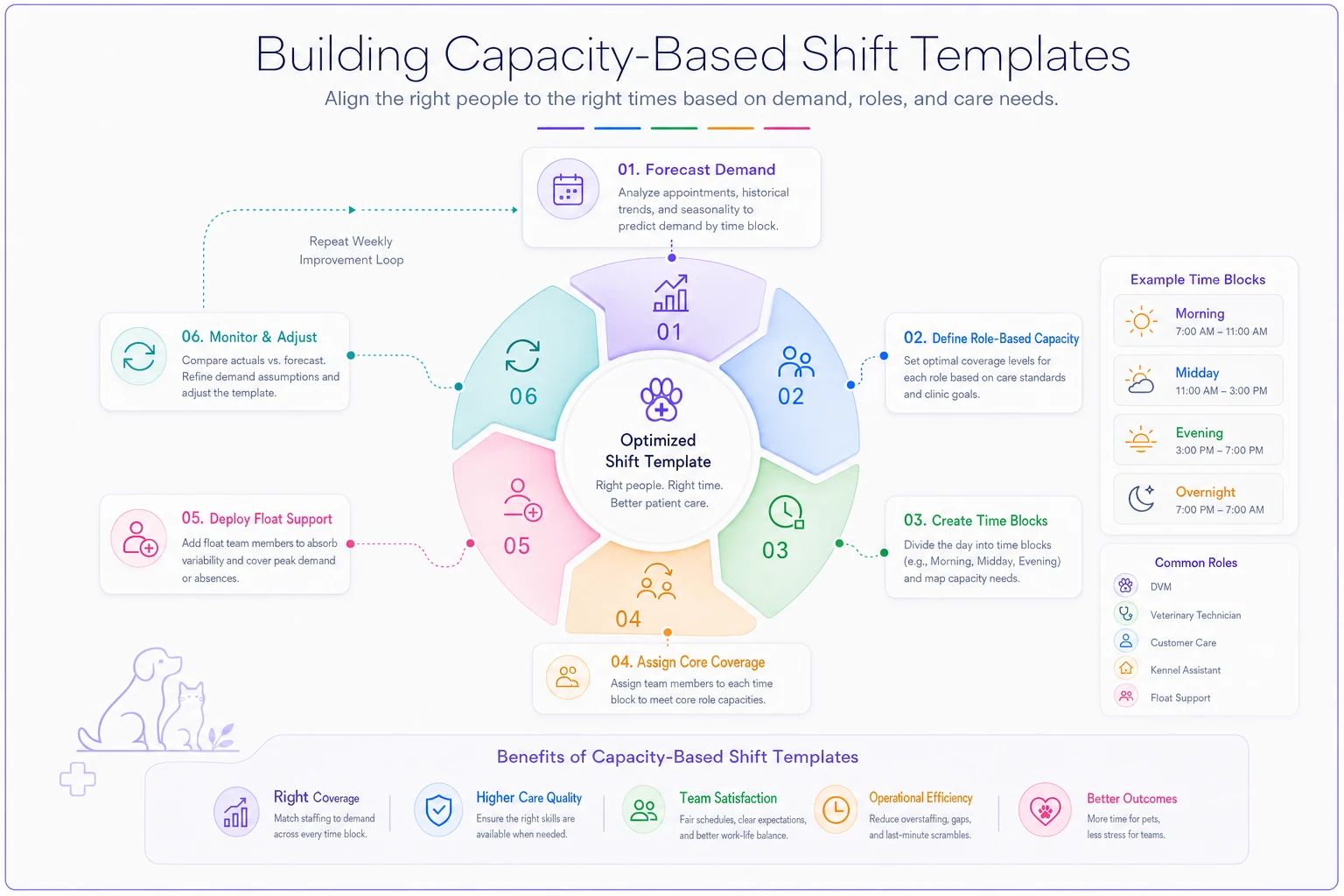
These templates become your baseline. Then you adjust based on specific factors: doctor vacation weeks need less surgical capacity but more general treatment support. Heartworm season requires additional lab processing capacity. End-of-month typically sees increased payment discussion time at reception.
The Float Pool Nobody Manages Right
Float pools in veterinary clinics usually mean "whoever we can convince to pick up extra shifts." That's not a float pool—that's desperation staffing. A real float pool operates as a structured capacity buffer with defined parameters and clear deployment rules.
Start with cross-training matrices. Not everyone needs to do everything, but everyone should be able to handle at least two core functions. A receptionist who can run basic labs. A kennel tech who can assist with patient intake. A surgical tech who can handle discharge instructions. This isn't about making everyone mediocre at multiple things—it's about creating operational flexibility.
Your float pool should be about 15-20% of your core staffing. For a clinic with 10 regular positions, that means 2 dedicated float staff who work predictable schedules but in varying roles. They're not sitting around waiting for callouts. They're actively scheduled into areas that need support, with the understanding they might shift roles mid-day based on demand.
-
Phone hold times exceed 90 seconds for 15 minutes straight
-
Treatment backup exceeds 4 patients waiting
-
Surgery turnover time exceeds 20 minutes between cases
-
Prescription processing backlog hits 10 requests
Keep a short weekly rota showing which float staff are trained for which core functions to speed mid-day role switches.
When these triggers hit, float staff shift roles automatically, not after a manager notices and makes a decision. This prevents the lag between problem identification and response that drives up wait times and labor costs.
Swap Approvals That Don't Create Chaos
Shift swapping in most clinics happens through group texts, sticky notes, and verbal agreements that nobody tracks. Then payroll arrives and suddenly Jennifer worked 52 hours while Michael only got 28, and neither matches what was originally scheduled.
A functional swap system needs structure without bureaucracy. Swaps should be employee-initiated but system-validated. This means checking three things automatically: certification requirements are met, overtime thresholds aren't exceeded, and minimum coverage levels are maintained.
-
Employee requests swap through a central system (not group text)
-
System validates the swap against operational rules
-
Both employees confirm the arrangement
-
Manager receives notification, not approval request
-
Schedule updates automatically in all systems
The distinction between notification and approval matters. If the swap meets all operational requirements, it should process automatically. Managers only intervene when rules are violated—like when a swap would leave surgery without certified assistance or create unauthorized overtime.
Track swap patterns over time. If the same employees constantly swap the same shifts, you probably have a scheduling preference mismatch that needs addressing. If certain days see excessive swap requests, your base schedule might not align with staff availability patterns.
Labor Cost Triggers Beyond Simple Percentages
Most clinics track labor as a percentage of revenue and call it a day. "We're at 45% this month" doesn't tell you anything actionable. Labor cost management needs operational triggers that connect spending to capacity utilization.
Tracking the wrong KPIs often means watching labor percentage while ignoring productivity metrics. Instead, build triggers around capacity-adjusted labor costs. This means comparing actual labor hours to required capacity hours, not just to revenue.
Green Zone (Optimal): Labor hours within 5% of capacity requirements
-
Continue current scheduling patterns
-
Document what's working for replication
Yellow Zone (Caution): Labor hours 5-10% over capacity requirements
-
Review float pool deployment
-
Identify specific overstaffing periods
-
Adjust next week's template
Red Zone (Action Required): Labor hours exceed capacity requirements by 10%+
-
Freeze overtime approval except emergencies
-
Audit actual vs scheduled hours
-
Review role utilization rates
-
Implement schedule optimization for next period
The triggers should drive specific actions, not general worry. When labor costs spike, you need to know exactly which shifts, which roles, and which decisions created the overage.
A clinic in Austin implemented this framework and discovered their Thursday afternoon consistently ran 15% over capacity requirements. The issue? They were staffing for their busiest Thursday ever (which happened once during spring break) rather than typical Thursday patterns. Adjusting just that one shift template saved roughly $2,800 monthly.
Connecting Schedules to Service Delivery
The real cost of poor scheduling isn't just labor dollars—it's service degradation that drives clients away. When you're understaffed, wait times increase, mistakes happen, and staff frustration builds. When you're overstaffed, employees stand around, engagement drops, and labor costs eat profit margins.
Overbooking creates similar cascade effects, but with scheduling, the impact is more subtle. Clients might not immediately notice that their exam took longer because you had one less tech, but they'll remember feeling rushed. They won't see the stressed receptionist juggling too many tasks, but they'll remember their calls going unanswered.
Service level agreements should directly inform scheduling decisions. If you promise callbacks within 4 hours, you need dedicated communication capacity during peak call-back windows. If you guarantee same-day lab results, you need consistent lab processing coverage, not just when someone has free time.
-
15-minute wait time maximum = reception capacity for 3-minute check-in average
-
Same-day lab results = dedicated lab tech 10 AM - 4 PM
-
4-hour callback window = 0.5 FTE communication capacity per 50 daily appointments
-
Next-day surgery scheduling = surgical coordinator available until 6 PM
This connection between service standards and staffing makes labor costs justifiable. You're not overstaffing—you're staffing to meet specific service commitments that retain clients and build reputation.
The Hidden Cost of Schedule Instability
Schedule chaos costs more than overtime payments. Every time someone's schedule changes last-minute, productivity drops for about two hours as they adjust to the new plan. When staff don't know their schedule more than a few days out, they can't plan their lives, leading to increased callouts and turnover.
Stability starts with publishing schedules at least two weeks in advance. This seems impossible when you're constantly adjusting for daily fires, but that's exactly why you need demand forecasting and capacity templates. Build the foundation schedule based on patterns, then adjust only for known variables like scheduled time off or seasonal changes.
The goal isn't rigid scheduling—it's predictable flexibility. Staff should know their base schedule months in advance, with the understanding that float assignments might shift based on daily needs. But those shifts happen within parameters: a morning person stays on morning shifts, a surgical tech stays in clinical roles, a part-timer doesn't suddenly get full-time hours.
Technology's Role Without the Hype
Modern scheduling platforms can dramatically improve these processes, but only if they're configured to match your operational reality. The fanciest veterinary staff scheduling system won't help if it's still making decisions based on appointment counts instead of capacity patterns.
AI-powered scheduling tools excel at pattern recognition and constraint optimization. They can identify that every third Tuesday needs extra coverage, or that certain staff combinations result in 20% higher productivity. They can automatically process swap requests against complex rule sets and predict next week's capacity needs based on historical patterns.
But these systems require good operational foundations. Garbage in still equals garbage out. If you haven't mapped your capacity needs, defined your triggers, or established your templates, automation just makes bad decisions faster.
-
Demand forecasting based on multiple data sources
-
Automatic float deployment based on real-time triggers
-
Swap validation against operational rules
-
Labor cost projections before schedule publication
-
Integration between scheduling and timekeeping systems
These aren't magic solutions—they're tools that execute your operational strategy more consistently than manual processes.
Making the Transition
Moving from reactive to capacity-based scheduling doesn't happen overnight. Start by collecting data on your actual capacity patterns for at least four weeks. Track everything: appointment types, walk-ins, phone volumes, processing times, wait times, and staff utilization.
Build your first templates based on the busiest sustainable patterns, not average days. It's easier to scale down when slow than scramble when busy. Test these templates for two weeks while maintaining your flexibility to adjust.
Introduce float pool concepts gradually. Start with one cross-trained person per shift who can shift roles as needed. Document which shifts benefit most from float coverage. Build from there.
Implement swap approval automation only after staff trust the base scheduling system. If they're still getting surprised by schedule changes, they won't adopt a new swap process.
Set labor cost triggers monthly at first, then weekly, then daily as your forecasting improves. Don't punish managers for missing targets while they're learning the system—focus on understanding variances and improving predictions.
Measuring What Actually Matters
Success in capacity-based scheduling isn't just about hitting labor percentage targets. Track these operational metrics:
-
Schedule stability
percentage of shifts that remain unchanged from initial publication
-
Capacity utilization
actual demand vs. scheduled capacity by role
-
Service level achievement
meeting promised response and wait times
-
Staff satisfaction
scheduling-related complaints and turnover
-
Swap efficiency
time from request to resolution
-
Float effectiveness
productivity during float assignments vs. regular roles
A clinic running this system well should see labor costs stabilize between 40-45% while maintaining or improving service levels. More importantly, they should see reduced manager time spent on scheduling fires, improved staff satisfaction, and better client experience metrics.
The Path Forward
Reactive scheduling keeps you trapped in a cycle of daily crisis management. Every sick call becomes an emergency. Every busy day catches you off-guard. Every slow day wastes labor dollars. The stress compounds until good employees leave for jobs with more predictable schedules.
Capacity-based scheduling breaks this cycle by making workforce decisions based on patterns, not panic. You staff for what typically happens, with built-in flexibility for variations. Labor costs become predictable. Service levels become consistent. Staff know their schedules weeks in advance.
The transition requires investment in process definition, data collection, and often new tools. But the return—in reduced labor costs, improved retention, and better service delivery—justifies the effort. More importantly, it transforms scheduling from a weekly nightmare into a manageable operational process.
Your veterinary staff scheduling system should be a strategic asset, not a constant source of stress. When you build it around capacity patterns, operational triggers, and service requirements rather than just appointment math, it becomes exactly that. The question isn't whether you can afford to make this change—it's whether you can afford not to.
Your veterinary staff scheduling system should be a strategic asset, not a constant source of stress. When you build it around capacity patterns, operational triggers, and service requirements rather than just appointment math, it becomes exactly that. The question isn't whether you can afford to make this change—it's whether you can afford not to.
Ready to elevate your clinic’s efficiency?
Join 500+ veterinary clinics using Veterinaryly to save time, reduce administrative overhead, and improve patient care.