


Most clinics don't lose lapsed clients on purpose. They lose them because the recall system treats a 14-year-old diabetic cat the same as a healthy adult dog that missed a rabies booster by three weeks. Same email. Same timing. Same tone. When everything gets the same follow-up, nothing gets the right follow-up.
The gap isn't marketing. It's operations. A win-back workflow that actually works is a segmentation problem first, a cadence problem second, and a scripting problem third. Get those three in the right order and lapsed clients start coming back without anyone on the front desk having to remember who's overdue.
This is the practical version of a veterinary lapsed client win-back workflow — how to segment by recency and value, when to automate versus pick up the phone, what to actually say, and how to know if any of it is working.
Start by defining "lapsed" more carefully than you think you need to
Almost every clinic makes the same mistake: they define lapsed as a single number. "No visit in 18 months." Then they blast the whole list.
The problem is that an 18-month gap means completely different things depending on the patient. A senior pet on a chronic med that hasn't been seen in 8 months is a clinical concern and a revenue concern. A young, healthy pet at 16 months is a routine reactivation. Treating both as "lapsed" flattens the urgency and wastes your best outreach effort on the wrong cases.
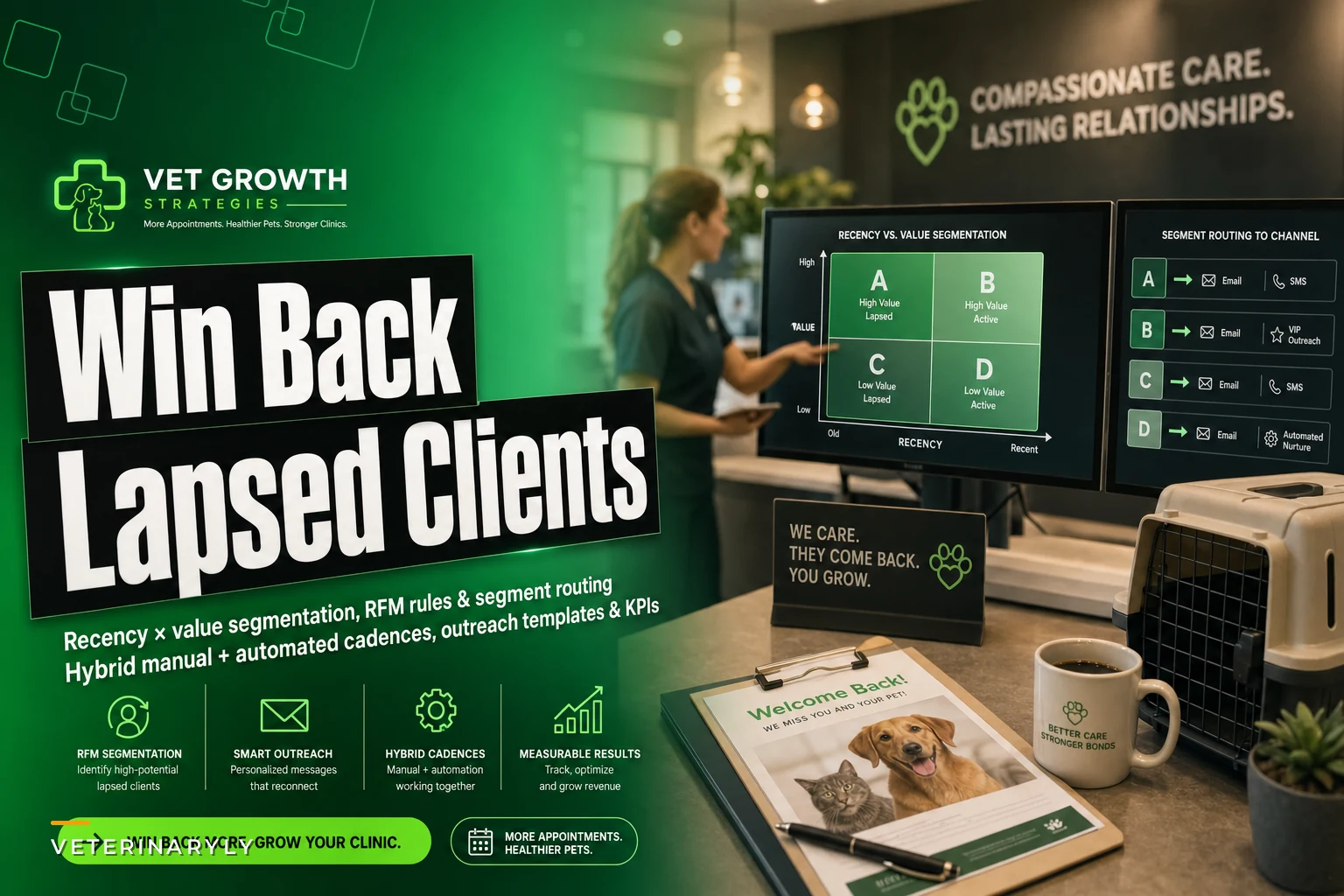
A cleaner approach is a two-axis grid: recency (how overdue) and value (historical spend plus care complexity). You don't need a data science team for this. Most practice management exports give you last visit date, lifetime spend, and whether the patient is on a recurring med or diagnostic schedule.
| Segment | Recency | Value / Complexity | Priority |
|---|---|---|---|
| A — Clinical + high value | 4–9 months overdue | Chronic med, senior, or high lifetime spend | Manual, urgent |
| B — High value, routine | 9–18 months | Strong spend history, no active condition | Semi-automated + one manual touch |
| C — Standard reactivation | 12–24 months | Average spend, healthy | Fully automated |
| D — Cold / likely gone | 24+ months | Low spend, one or two visits ever | Low-cost automated, then archive |
The insight most clinics miss: your highest-value lapsed clients often look the least lapsed because they were regulars. A client who came in every five weeks for years and then vanished for four months is a bigger red flag than a once-a-year client at month 14. Recency has to be measured against their pattern, not a universal calendar.
This distinction matters more than most clinics realize, and it's worth getting right before you build any cadence on top of it.
Recency and value rules that actually drive the action
Once you have the grid, the rules should be boringly specific. Vague rules produce vague execution. Here's the kind of rule set that holds up on a busy Monday.
Never miss a pet’s appointment again.
Veterinaryly helps you schedule, confirm, and manage every appointment and patient record effortlessly.
- Centralized appointment & patient management
- Automated client reminders
- Staff scheduling & task tracking
No credit card required
Recency triggers:
-
Chronic-care patients (renal, diabetic, thyroid, cardiac)
flag at 30 days past their expected recheck, not 90.
-
Senior wellness (7+ years)
flag at 4 months past due.
-
Adult wellness
flag at 12 months since last visit.
-
Puppy/kitten series drop-off
flag at 3 weeks past a scheduled vaccine in the series.
Value modifiers:
-
Lifetime spend in your top roughly 20% bumps the client up one priority tier.
-
Active recurring medication automatically routes to a manual touch, regardless of spend.
-
Multiple pets in the household — treat the household, not the individual pet. If one dog is overdue and the other is a chronic patient, one call covers both.
Worth calling out specifically: puppy and kitten series drop-off is the single most under-worked segment in most clinics. Those families are in the building, engaged, and then they miss visit two or three and quietly disappear. They're not "lapsed" in anyone's mind yet, so nobody chases them — and you lose a potential 12-year relationship over a missed $40 booster. If your grid does nothing else, catch this one.
Treat puppy and kitten series drop-offs as urgent by contacting families at the 3-week missed-vaccine mark to prevent early churn.
The modifiers aren't complicated, but they do require someone to set the rules once and actually trust them. Most of the clinics that skip this step end up back at "we just call whoever seems overdue," which is really just doing nothing with extra steps.
Automated vs. manual: where each belongs
The temptation is to automate everything because it's cheaper. The opposite instinct — call everyone — burns out your front desk and never scales. The right answer is a split based on the segment grid.
Automation should carry the volume: standard reactivations, cold list, and the first touch on routine high-value clients. A human should handle the judgment calls — chronic patients, recent no-shows on important care, and anyone where a wrong-tone message could feel careless.
When automation makes sense:
-
Segment C and D reactivations where the message is genuinely generic ("we noticed it's been a while, here's how to book").
-
First-touch reminders across any segment.
-
Anything where a delay of a day or two doesn't create clinical risk.
When manual is worth the labor cost:
-
Any chronic or senior patient overdue on medical care. This is a clinical follow-up first and a revenue action second.
-
High-value clients who didn't respond to the automated touches — a person, not a template, closes these.
-
Households where the record shows a complaint, a euthanasia, or a billing dispute. Automation here does real damage.
Who should NOT rely heavily on manual outreach:
-
Single-doctor practices with one front-desk person. If that's you, keep the manual list tight — maybe the top 10–15 clinical cases per week — and let automation handle the rest. A manual list you never actually call is worse than a good automated sequence, because it creates the illusion the work is happening.
This is also where clinics quietly overspend on labor. Reactive, unstructured recall — where the team calls whoever comes to mind between appointments — costs far more in wasted time than a segmented system and produces worse results. If you've read our breakdown on why tracking the wrong KPIs costs your clinic revenue, the same principle applies here: effort without the right targeting looks like activity but doesn't move the number that matters.
Sample cadence tables
Cadence is where good intentions fall apart. Either the messages come too fast and feel spammy, or they trail off after one attempt and never reach the client on a day they were ready to book. Below are two cadences — one automated, one manual — that hold up in real clinic flow.
Automated cadence (Segments C & D, routine reactivation):
| Day | Channel | Purpose |
|---|---|---|
| 0 | Soft nudge — "it's been a while," easy booking link | |
| 5 | SMS | Short reminder, single tap to book |
| 14 | Value-framed — what a wellness visit catches early | |
| 30 | SMS | Final touch — light incentive if you use them |
| 31+ | — | Move to dormant list, revisit at next annual sweep |
Manual cadence (Segment A, chronic/high-value):
| Day | Channel | Purpose |
|---|---|---|
| 0 | Phone call | Clinical check-in, book recheck |
| 2 | Voicemail follow + SMS | If no answer, warm text referencing the call |
| 5 | Phone call (different time of day) | Second attempt, avoid same-hour repeat |
| 8 | Email from the doctor/tech | Personal note, medication or condition context |
| 14 | Final call | Last attempt before moving to semi-automated hold |
The detail that matters most: vary the time of day between call attempts. A clinic calling the same client at 2pm three times in a row will keep missing the person who works until 5. Two attempts at genuinely different times beat five at the same hour. It sounds trivial. It's one of the biggest reasons "we tried calling" turns into a dead lead.
The outreach templates (and what to strip out of them)
Most win-back messages fail because they're written for the clinic's convenience, not the client's decision-making. "Your pet is overdue for services" is administrative. It doesn't answer the only question the client is actually asking: why should I deal with this right now?
Automated email — routine reactivation:
> Hi [First Name], it's been a while since we've seen [Pet Name], and we wanted to check in. Regular visits help us catch small issues before they turn into expensive ones. Booking takes about a minute — [link]. If [Pet Name] has been doing great, that's wonderful too; we'd still love to keep the record current. — The team at [Clinic]
Manual call script — chronic patient:
> "Hi [First Name], this is [Name] from [Clinic]. I'm calling about [Pet Name] — we had them on a recheck schedule for [condition], and it looks like we're a bit overdue. I wanted to make sure everything's going okay and get them back on the calendar so we stay ahead of it. Do you have a couple minutes?"
Notice what's not in there: guilt, jargon, or a wall of service names. The chronic-patient script leads with the pet's health, not the missed appointment. Clients who ghosted often feel a little sheepish, and a message that quietly forgives that gets a far better response than one that reminds them how far behind they are.
One template rule that consistently outperforms: the second automated touch should reframe value, not repeat the reminder. The first message says "it's been a while." The second says "here's what a visit actually prevents." People who ignored the first nudge will sometimes respond to the reason behind it.
A practical win-back workflow — from segmentation to action
To make this more concrete, here's how the process flows from export to outreach:
-
Export your client list from your practice management system — pull last visit date, lifetime spend, and active medication flags.
-
Apply the two-axis grid — sort by recency against their individual visit pattern, then layer in the value modifiers.
-
Assign each client to a segment (A through D) based on the rules above.
-
Route Segment A to the manual call list — chronic and high-value cases get a human first.
-
Queue Segments C and D into automated sequences — email and SMS cadences fire on schedule without front-desk involvement.
-
Segment B gets a hybrid approach — automated first touch, then a single manual follow-up if there's no response within 10 days.
-
Track contact attempts and outcomes — log which channel drove the booking, and flag unresponsive contacts for the next review cycle.
-
Review and adjust monthly — reactivation rate by segment tells you where the workflow is working and where it's breaking down.
Here's a simple visual of that workflow.
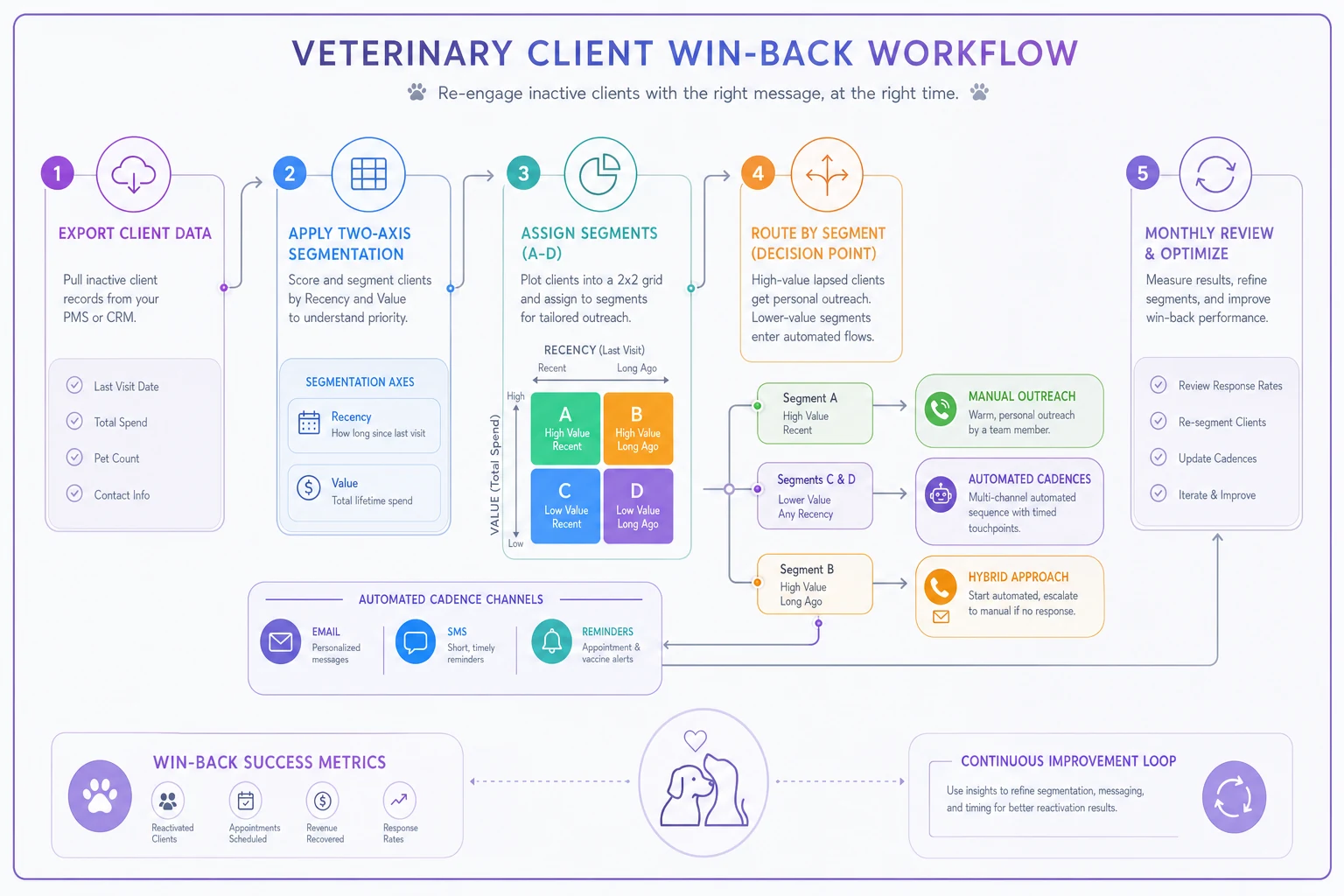
The steps aren't complicated. The hard part is committing to the grid instead of defaulting back to "whoever the front desk remembers."
KPIs that tell you if it's working
If you can't measure the win-back workflow, you'll either kill a good system too early or keep a broken one running for a year. Keep the metrics few and honest.
-
Reactivation rate by segment — percentage of contacted lapsed clients who book within 30 days. Track A, B, and C separately; a blended number hides everything useful.
-
Contact-to-book conversion — of the ones you actually reached (not just messaged), how many booked. This separates a targeting problem from a messaging problem.
-
Channel response rate — which touch actually drove the booking. You'll often find SMS carries far more weight than email, and you can rebalance effort accordingly.
-
Revenue per reactivated client (90-day) — reactivated chronic patients are worth multiples of routine ones. This is where value segmentation proves itself.
-
Cost per reactivation — mostly staff time on the manual list. If a segment costs more to work than it returns, automate or drop it.
The pattern to watch: if your contact-to-book conversion is strong but your overall reactivation rate is weak, you don't have a script problem — you have a reaching problem. Wrong numbers, dead emails, calls at bad times. Fix the contact layer before rewriting a single template.
For the bigger picture on how a reactivated client fits into long-term value, our piece on going from first visit to lifetime value walks through why a recovered chronic patient can be worth more than several new-client acquisitions.
A real scenario
A two-doctor small-animal clinic had roughly 3,800 active clients and a recall list they described as "the spreadsheet nobody opens." Their process was whatever the front desk got to between appointments — realistically, a handful of calls a week, no segmentation.
They built the grid over a weekend using a practice management export. About 210 clients landed in Segment A (chronic or high-value, overdue). Roughly 900 fell into C and D. The rest were current or borderline.
The change was mostly about order of effort. Automation took the C/D volume off the front desk entirely. The team's manual time — maybe 3–4 hours a week total — got pointed only at Segment A, using the phone-first cadence with varied call times.
Over the following quarter, they reactivated somewhere around 55–70 of the Segment A patients. Because those were chronic and senior cases, the per-client value was high. Several of those pets were genuinely overdue on care that mattered, not just overdue on a calendar. The automated C/D sequence pulled in a slower, steadier trickle of routine rebookings that used to just never happen.
Nobody was working harder. The work was just aimed at the right people.
Where software quietly earns its place
You can run all of this manually, and plenty of small clinics do. The friction is real though: exporting lists, tagging segments, remembering which client got which touch on which day, and making sure the chronic-patient list actually gets called instead of buried under everything else.
This is where an operational platform with automation built in stops being a nice-to-have. The value isn't flashy — it's that segmentation rules run automatically off your visit and spend data, the routine touches fire on schedule without anyone remembering them, and the manual list surfaces the right handful of clinical cases each week instead of a spreadsheet nobody opens.
The judgment stays human. The remembering, sorting, and sequencing stop depending on a busy front desk having a good day. Used that way, automation doesn't replace outreach — it just makes sure the outreach you already believe in actually happens, consistently, to the clients who matter most.
The short version
A win-back system fails when everyone gets the same message. It works when you segment by recency and value, put humans on the clinical and high-value cases, let automation carry the routine volume, vary your cadence and call times, and measure reactivation by segment instead of as one blurry number.
Start with the grid, fix your contact layer, and aim your best effort at the clients most likely to come back — and most worth having back.
Start with the grid, fix your contact layer, and aim your best effort at the clients most likely to come back — and most worth having back.
Ready to elevate your clinic’s efficiency?
Join 500+ veterinary clinics using Veterinaryly to save time, reduce administrative overhead, and improve patient care.